

Automating waitlist promotions and notifications inside your studio management system is the fastest way to raise fill rates and cut administrative hours. That means turning on immediate cancellation triggers, automatic priority and eligibility checks, and multi-channel confirmations instead of a staff member texting names off a list. Tune the confirmation window to your studio's rhythm, then let the system run. A platform like this builds these controls in from the start.
TL;DR:
- Automated waitlists enable instant promotion triggers and multi-channel notifications, significantly increasing class fill rates toward 95 percent, compared to 71 percent for manual management.
- Fast response times, ideally within 15 minutes to four hours, are crucial for high conversion rates, with notification speed being a key factor in filling cancellations promptly.
- Proper configuration of confirmation windows, waitlist caps, and clear cancellation policies prevents long queues that frustrate families and distort demand signals.
- Charging deposits should be reserved for high-demand or specialty classes, with billing automatically triggered upon waitlist spot confirmation to avoid support issues.
- Regular pilot testing and data tracking of response times, fill rates, and false positives ensure the automation system aligns with studio demand and minimizes manual oversight.
Table of Contents
- Why an Automated Dance Class Waitlist Matters
- What to Require in Your Dance Class Waitlist Management Software
- Setting Confirmation Windows, Caps, and Cancellation Rules
- How the Waitlist Actually Works From Checkout to Confirmed Spot
- Rolling Out Waitlist Automation: A Launch Checklist
- Handling Deposits and Payments for Waitlisted Classes
- Keeping Waitlisted Families Informed and Offering Alternatives
- Why Studioflare Built Waitlist Automation This Way
- Put Your Waitlist for Dance Classes on Autopilot
- Sources
- FAQ
Why an Automated Dance Class Waitlist Matters
Manually running a dance lesson waiting list eats staff time that should go toward teaching and program growth. Studio administrators using AI-driven scheduling save roughly 8 to 10 hours per week once cancellations, waitlist promotions, and parent communications stop requiring a human in the loop.
That time savings come with a fill-rate payoff. Studios running automated waitlists see class fill rates climb toward 95%, compared with an average around 71% for studios still managing lists by hand. The gap comes down to speed. A parent who gets a text within seconds of a cancellation responds differently than one who gets a voicemail two days later.
The numbers behind speed to notify: Automated notifications convert cancellation openings at roughly 65 to 70%, while manual phone or email outreach converts closer to 30%. The difference isn't the message. It's how fast it goes out.
Once the front desk stops chasing waitlist spots, that reclaimed time shifts toward things that actually grow a studio: building new class formats, coaching instructors, or following up with families who haven't re-enrolled. Waitlist management stops being a task and becomes a reporting line you check once a week.
What to Require in Your Dance Class Waitlist Management Software
Not every studio management platform handles a waitlist for dance classes the same way, and the gaps show up fast once a popular class fills. Before you commit to software (or decide your current system is good enough), check for these five capabilities.
- Immediate promotion triggers. The moment a spot opens, the system should notify the next eligible family in seconds, not on a nightly batch job.
- Configurable hold windows. You need the ability to set how long a family has to confirm before the spot passes to the next person in line.
- Multi-channel notifications with one-click confirmation. SMS, email, and push alerts should all lead to the same simple action: tap to confirm, no login required.
- Priority and eligibility logic. The system should automatically check age, skill level, sibling status, and returning-student status before offering a slot.
- Queue visibility and capacity caps. Families should see roughly where they stand, and the studio should cap the waitlist length relative to class size.
- Fill-rate and conversion reporting. You need a dashboard, not a manual tally, to know whether the waitlist is actually working.
Pro Tip: *Ask any vendor demoing their waitlist for dance classes feature to show you the actual notification a parent receives.
Setting Confirmation Windows, Caps, and Cancellation Rules
Good defaults save you from either a waitlist that never fills or one that annoys your families. Here's a starting configuration, in the order you should set it up.
- Set your confirmation window between 15 minutes and 4 hours, shorter for cancellations close to class time, longer for ones days out. Dynamic hold windows tied to how far out the cancellation happens tend to outperform a single fixed window across the board.
- Cap the waitlist relative to class capacity. Excessively long queues create false hope, increase customer service complaints, and distort demand perception.
- Set a cancellation cutoff well before class start time, paired with a late-cancel fee to discourage last-minute drops that leave insufficient time to notify waitlisted families.
- Build a priority hierarchy before you turn automation on. A common order: returning students first, then siblings of currently enrolled dancers, then age/level-eligible new students. Enforcing eligibility automatically prevents the system from bumping a student into a class above their level just because they were next in line.
Run these settings for a few weeks before assuming they're final. Confirmation windows in particular deserve testing against your specific families rather than a generic benchmark.
How the Waitlist Actually Works From Checkout to Confirmed Spot
The sequence matters more than any single setting. Here's what should happen, step by step, without a staff member touching it.
- At checkout, the registration page shows real-time seat availability and a clear "Join Waitlist" button that confirms the family's queue position immediately.
- On cancellation, the system automatically notifies the next eligible person, holds the spot for the configured window, confirms enrollment on response, and updates the roster, no phone calls required.
- If nobody responds within the window, the system advances to the next person automatically and logs the non-response for your records.
- For edge cases, staff should retain the ability to override an automated promotion manually, but every override should get logged so you can spot patterns (a sibling being skipped, a level mismatch) and fix the rule instead of the individual case.
Showing availability clearly at checkout also cuts down how many people land on the waitlist for dance classes in the first place. When real-time enrollment numbers are visible during registration, fewer families defer a decision they'd otherwise make on the spot.
Rolling Out Waitlist Automation: A Launch Checklist
Before flipping automation on for every class, confirm the basics: class capacities are accurate, intake questions capture age and experience level, notification channels are set per family preference, and your cancellation policy is written down somewhere parents can find it.
- Pilot across 3 to 5 classes that represent different age groups and popularity levels, not just your top seller.
- Track four numbers weekly: fill rate, conversion rate on automated promotions, average response time, and false-positive promotions (someone offered a spot they weren't actually eligible for).
- Adjust the confirmation window based on response-time data, not guesswork, then re-measure for another week.
- Expand studio-wide once fill rate trends toward the 85% to 95% range and false positives drop near zero.
Pro Tip: Watch response time more than fill rate in week one. A slow average response time usually means your notification channel choice, not your window length, is the problem.
The most common rollout mistake is skipping the pilot and launching everywhere at once. When a priority rule is misconfigured, you want to catch it on five classes, not fifty.
Handling Deposits and Payments for Waitlisted Classes
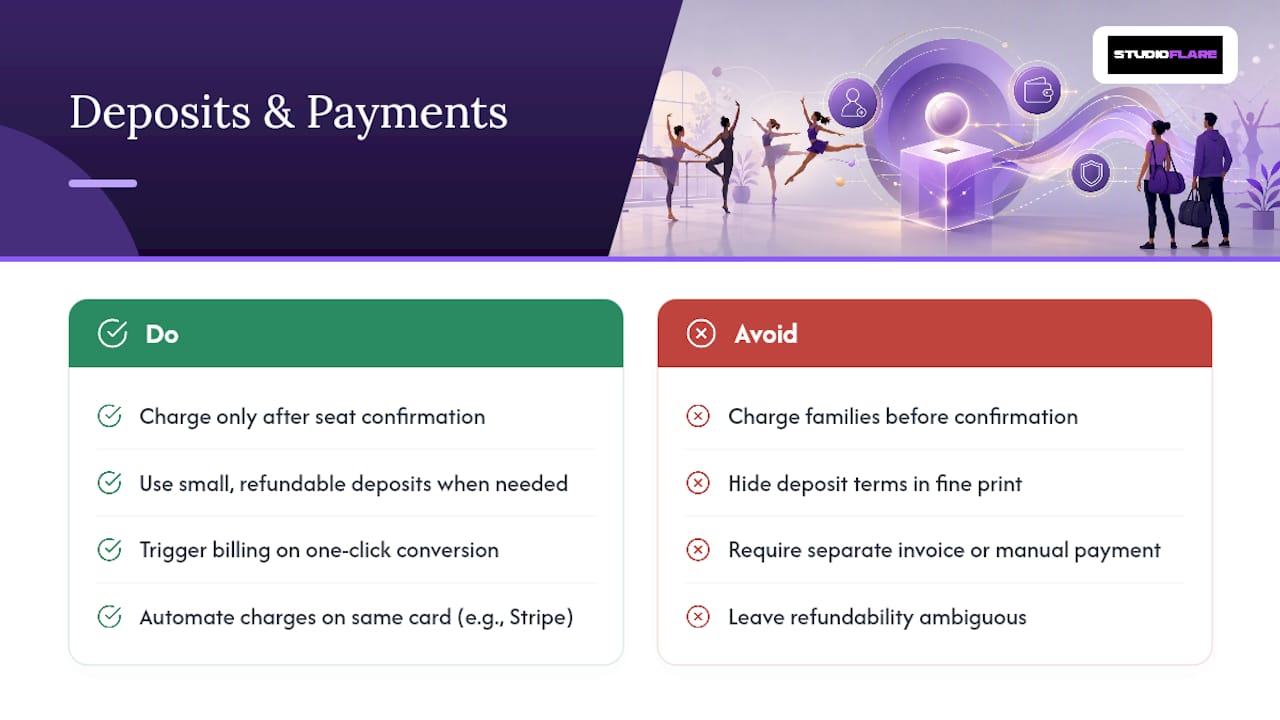
Charging a family before they have a confirmed seat creates more support tickets than it solves. Most studios that run this well don't collect payment until a waitlist spot converts to an actual enrollment. The one-click confirmation that moves someone off the waitlist should trigger billing immediately afterward, not before.
Where a deposit does make sense is for high-demand classes with a documented history of no-shows once families reach the top of the queue, competition teams or specialty workshops, for instance. In that case, keep the deposit small, refundable if the spot never opens, and clearly disclosed at the moment someone joins the waitlist for a dance class, not buried in the fine print.
Automated billing through systems like Stripe makes this easier to manage cleanly. The moment a queue position converts, the tuition charge should process on the same card or payment method already on file, with no separate invoice or manual entry step. A documented online payment flow keeps the deposit-to-tuition transition from becoming its own administrative burden.
Whatever your policy, put it in writing where parents see it during registration. Ambiguity about whether a deposit is refundable is one of the fastest ways to turn a waitlist experience into a complaint.
Keeping Waitlisted Families Informed and Offering Alternatives
Silence is the single biggest driver of frustration for anyone sitting on a dance lesson waiting list. A family that joins a queue and hears nothing for two weeks assumes the worst, even if a spot might open tomorrow. Automated status updates, even a simple "You're currently in position 3 of 8", cut down on the "did you get my registration?" messages that clog your inbox.
Beyond status updates, the more valuable move is surfacing alternatives proactively. If a Tuesday 4pm ballet class is full, your system should be able to flag open spots in a Thursday session at the same level, or a comparable class one age bracket up or down. This is where waitlist data becomes useful beyond the individual family: consistent demand piling up on one specific day and time is a signal you probably need to add a section, not just manage a longer queue.
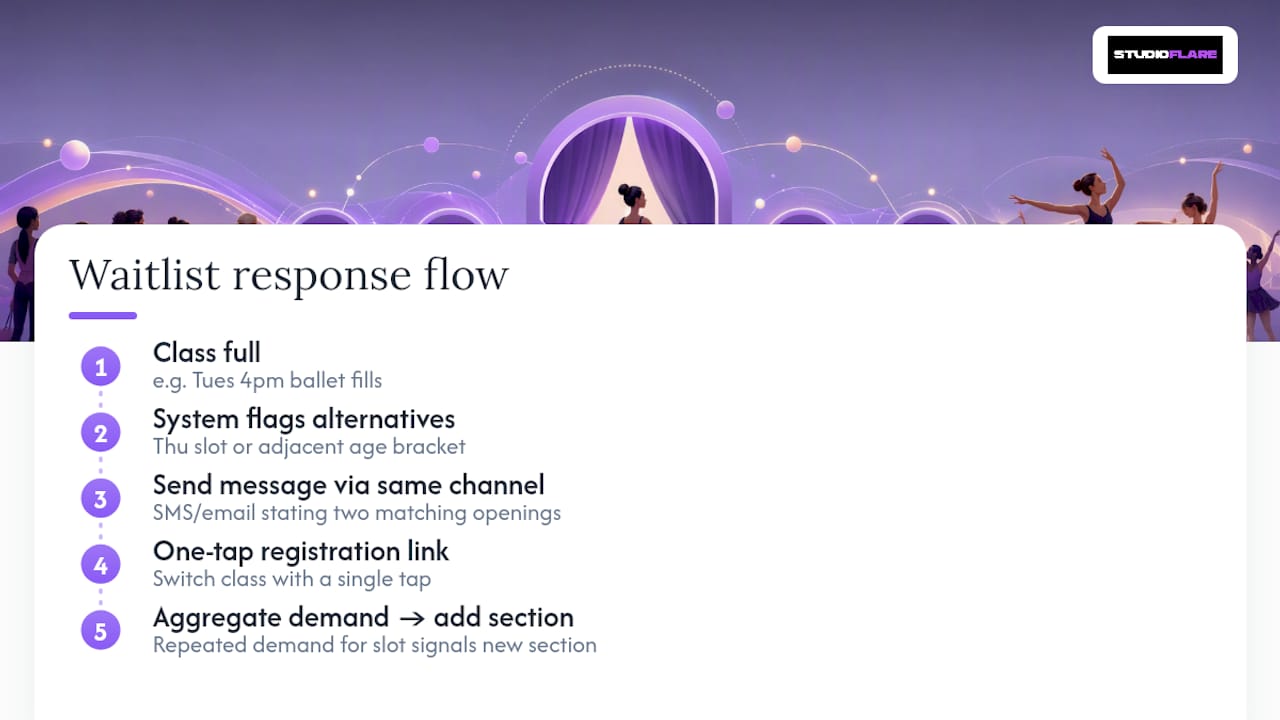
Communicating alternatives works best through the same channel families already used to join the waitlist, an SMS or email that says "This class is full, but here are two openings that match what you're looking for" converts far better than making a parent call the front desk to ask. Include a direct registration link in that message so switching classes takes one tap, not a phone call and a hold.
Set expectations early, too. Telling a family up front how a dance class waitlist typically moves, and roughly how long similar spots have taken to open in past sessions, keeps their expectations realistic instead of leaving them guessing.
Why Studioflare Built Waitlist Automation This Way
Most waitlist tools treat notification as an afterthought bolted onto registration software. Our AI assistant handles the queue logic and eligibility checks; Stripe billing handles the payment moment; built-in notifications handle the rest.
— StudioFlare Team
Put Your Waitlist for Dance Classes on Autopilot
This platform replaces the spreadsheet-and-group-text approach to waitlist management with the exact workflow this guide describes: automated promotion the second a spot opens, priority rules that check age and sibling status without a staff member eyeballing a list, and one-click confirmations sent by SMS, email, or push.

Registrations, billing, and waitlist logic all live in the same platform, so a confirmed spot triggers tuition charges automatically instead of creating a separate invoicing step. Studios switching from spreadsheet-based systems or older platforms often start on the Mindbody alternative built for dance studios page to see the full feature set side by side. If you're ready to see how automated waitlist promotions would run against your own class schedule, create your studio account and set up your first automated waitlist today.
Sources
- AI Dance studio software: scheduling & automation in 2026
- Fitness studio waitlist management guide
- Class waitlist management: automating the fill-up flow
FAQ
How long does a dance class waitlist usually take to move?
It depends heavily on class popularity and cancellation frequency, but studios with automated notifications typically see spots convert within minutes to a few hours once a cancellation occurs, versus days under manual outreach.
What confirmation window should I set for waitlist notifications?
Start with 15 minutes to 4 hours, shorter close to class time and longer for early cancellations, then adjust based on your families' actual response times over a few weeks.
Should I charge a deposit when someone joins a waitlist?
Most studios wait to charge until a waitlist spot converts to a confirmed enrollment; a small refundable deposit only makes sense for high-demand classes with a documented no-show pattern.
How big should my waitlist cap be?
A queue larger than the class itself creates false expectations and rarely converts at a meaningful rate.
Does automating my dance class waitlist actually improve fill rates?
Yes. Automated systems report fill rates up to 95% versus roughly 71% for manual processes, largely because faster notifications convert better. Platforms like Studioflare build this automation directly into registration and billing.