

A dance studio parent portal must do five things well: centralize registration and family profiles, show live schedules, run messaging, control livestream access, and automate tuition billing through Stripe, all with granular admin permissions behind it. Centralizing those pieces cuts down front-desk calls and missed payments and makes parents feel like the studio has its act together. StudioFlare builds these features specifically for dance studios, not retrofitted from gym or martial-arts software. Your next move: run every vendor through a prioritized checklist before you sign anything.
Key Takeaways
A dance studio parent portal succeeds when registration, payments, messaging, and attendance live in one system with Stripe-based automated billing and clear admin permissions.
| Point | Details |
|---|---|
| Centralize the family experience | One account per family, covering every dancer, cuts down repeat questions to the front desk. |
| Automate billing through Stripe | Recurring charges, prorations, and dunning reminders improve on-time payment collection. |
| Match features to studio size | Require must-haves like registration and billing first; treat livestreaming and advanced reporting as later additions. |
| Roll out in stages | Pilot with one or two classes for two to four weeks before a full studio-wide launch. |
| Track KPIs after launch | Watch payment collection rate, admin hours saved, and parent engagement for 60 to 90 days. |
| Choose a dance-specific platform | StudioFlare pairs family billing, livestreaming, and attendance tools built around how dance studios actually operate. |
Table of Contents
- What Is a Dance Studio Parent Portal, Exactly?
- Which Features Should You Require First?
- How Do Staff and Parents Actually Use the Portal Day to Day?
- What Should You Expect From Payments and Data Security?
- How Do You Roll Out a Parent Portal Without Chaos?
- Which Metrics Prove the Portal Is Working?
- What Questions Should You Ask Before You Buy?
- Why a Studio-Built Portal Beats a Retrofitted One
- If You Want a Studio-Ready Parent Portal
- Sources
What Is a Dance Studio Parent Portal, Exactly?
A parent portal is the family-facing side of your studio management software. It's where parents log in to register their dancer, check the schedule, pay tuition, message the front desk, and (increasingly) watch a class livestream if they can't make it in person. Think of it as the difference between texting twelve parents individually about a schedule change and having them all see the update the moment it posts.
The feature set that actually matters, confirmed on any serious demo or spec sheet:
- Registration and digital waivers tied to a single family account that covers multiple dancers, so a parent with three kids in four classes isn't juggling separate logins.
- Class roster and schedule view that's mobile-friendly and syncs to a personal calendar.
- Messaging hub for targeted email, SMS, and push notifications by class, level, or family.
- Payments and tuition management, including recurring billing, invoice history, and direct Stripe integration for card processing.
- Attendance and check-in that updates the family account and any class-pack balance automatically.
- Livestream or virtual-class access, gated by roster and event permissions, not a public link anyone can share.
- Admin controls: role-based permissions, staff access levels, audit logs, and exportable reports.
- Parent UX basics: a mobile app or a genuinely responsive portal, dependable reminders, and one-tap card updates.
Essential parent-portal features consistently include online registration, automated billing, scheduling, and communication tools as the baseline, not the upsell. If a vendor treats any of these as an add-on module, that's worth noting before you negotiate price.
Which Features Should You Require First?
Not every studio needs the same feature stack on day one. A 60-family competitive studio and a 400-family recreational program are shopping for different things, even if the pitch deck looks identical.
Must-have, non-negotiable:
- Family accounts with multi-child registration
- Automated Stripe billing
- Live schedule and class roster
- Basic email/SMS messaging
- Digital attendance tracking
Should-have, worth a real conversion boost:
- A polished mobile app or responsive portal
- Calendar sync (Google, Apple)
- Targeted group messaging by class or level
- Role-based admin permissions
Nice-to-have, weigh against budget:
- Built-in livestreaming
- Costume and event management
- Advanced reporting and marketing automation
Map each feature to a number before you decide. Automated billing that cuts your late-payment rate by even a few points pays for the subscription; attendance tracking that saves your front desk three hours a week pays for itself in a different currency entirely.
How Do Staff and Parents Actually Use the Portal Day to Day?
Picture the roles first, because permissions only make sense once you know who's touching what. Owner gets full access. Manager handles schedules and payments. Front-desk staff run check-in and attendance. Teacher sees roster and notes. Parent gets a family view: their kids, their invoices, their messages.
The daily workflows that actually happen:
- Enrolling a new student mid-session and prorating tuition automatically
- Swapping a dancer between two class times without a manual reshuffle
- Issuing a refund without digging through a spreadsheet
- Managing a class waitlist that fills itself when a spot opens
- Posting an announcement to one level instead of the whole studio
A typical morning looks like this: front-desk staff check students in on a tablet, attendance updates the family account in real time, and that evening the system runs automated late-payment reminders without anyone touching a phone.
Pro Tip: Before you sign a contract, ask specifically who can change a tuition plan and who can export the full family list. If the answer is "everyone with a login," that's a data-governance gap you'll regret during a staff transition.
Require audit logs with time-stamped actions. When a refund gets questioned three months later, you want a record, not a guess.
What Should You Expect From Payments and Data Security?
Tuition billing should run itself. That means recurring charges, prorated amounts for mid-month starts, family-level invoices covering multiple dancers, and full payment history visible to both staff and parents.

Automation matters more than it sounds. Automated billing with built-in dunning reminders returns hours of admin time and directly improves how much tuition actually gets collected on schedule, instead of chased down by phone.
Security baseline to confirm before you sign:
- PCI-compliant processing, not a workaround
- Role-based access limiting who sees payment details
- Encrypted data, both at rest and in transit
- Regular, verifiable backups
Explicit Stripe integration matters here specifically because tokenized cards and webhook-based updates keep raw card data off your studio's servers entirely, which shrinks your PCI compliance burden to something manageable. Ask every vendor directly: how are chargebacks handled, and is there an automated retry schedule for failed payments, or does that fall on your staff to chase manually?
How Do You Roll Out a Parent Portal Without Chaos?
Rolling out new software mid-season is how studios end up with angry parents and a front desk that's drowning. A staged approach avoids both.
- Pre-launch: Export your family, student, and enrollment spreadsheets, map the fields to your new system, and confirm your Stripe account is fully configured.
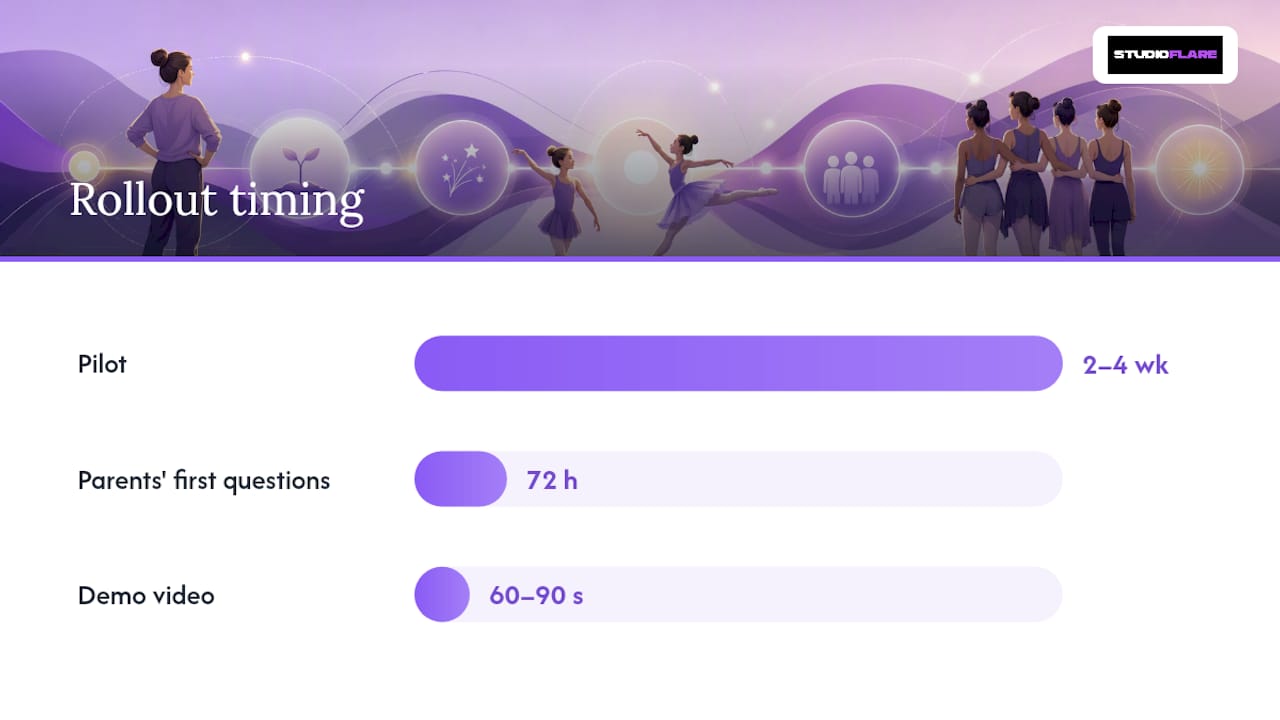
- Pilot: Run one or two classes, or a single age group, for two to four weeks and collect real feedback before expanding.
- Full rollout: Migrate all remaining data, train staff on their specific roles and permissions, launch a parent communication campaign, go live, then keep a support window open for the first few weeks.
A staged rollout with early parent communication heads off the confusion that sinks adoption in studios that just flip the switch overnight.
Keep training materials simple: a one-page login guide, a 60 to 90 second demo video showing the schedule and payment flow, and a front-desk cheat sheet for common questions. Small studios can realistically finish migration, pilot, and rollout in a few weeks. Larger studios with more staff and more legacy data should budget several weeks to a few months.
Pro Tip: Schedule a virtual "help hour" the week after go-live. Parents will have questions in the first 72 hours, not the first month, and a live drop-in session catches problems before they become one-star reviews.
Which Metrics Prove the Portal Is Working?
Five numbers tell you whether the switch paid off:
- Payment collection rate: on-time payments as a percentage of total invoiced.
- Admin time saved: hours per week on front-desk tasks, measured before and after.
- Parent engagement: portal logins per family, message open rates, event RSVP rates.
- Attendance capture rate: share of classes checked in digitally versus paper.
- Retention signals: change in recurring enrollment and class-pack utilization after rollout.
Track these for a couple of months after go-live. If your collection rate hasn't moved and admin hours look the same, something in the rollout, not the software, needs a second look.
What Questions Should You Ask Before You Buy?
Watch for these red flags on any demo: a vague billing model nobody can explain clearly, no direct Stripe integration, a clunky mobile experience, only one or two admin roles, no audit logs, no clean data export option, and a support team that can't commit to a response time.
Bring these eight questions to every vendor call:
- How does your family and multi-child account model actually work?
- Do you integrate directly with Stripe, including tokenized cards?
- Can parents book classes and pay from a phone without friction?
- How is livestream access tied to roster and enrollment?
- What admin roles exist, and how granular are the permissions?
- How are refunds and chargebacks processed?
- What onboarding and ongoing support do you actually provide?
- How do we export our data, and what happens if we cancel?
A real parent portal should let families manage schedules and registration from one place and support automated mass billing, confirm that directly rather than assuming it from the sales deck. Demand a trial with your actual data, a sandbox import if nothing else, and log in as a parent yourself before you commit.
Why a Studio-Built Portal Beats a Retrofitted One
Most parent-portal software started life built for gyms or general fitness studios, then had dance features bolted on later. That shows up in small but constant friction: costume management that doesn't exist, recital livestreaming that feels like an afterthought, class-pack logic that doesn't match how dance studios actually bill.
Studios that build around a platform designed for their specific workflow, family billing, livestreaming, attendance tied to class packs, tend to see faster staff adoption because nothing feels like a workaround.
If You Want a Studio-Ready Parent Portal
StudioFlare is built specifically for dance studios, not adapted from a generic fitness template, and that shows up in the details that actually cause friction elsewhere: family accounts covering multiple dancers, automated tuition billing through Stripe, built-in livestreaming for recitals and remote students, attendance and check-in that updates in real time, and role-based admin controls that keep refunds and data exports where they belong.

If you're currently running your studio on spreadsheets and a group text thread, migration support and training materials are part of onboarding, not an extra line item. Compare the full feature set on the StudioFlare platform page, or look at how it stacks up as a Mindbody alternative if you're already evaluating a switch. When you're ready to see it with your own class schedule, create your studio and test the parent login flow yourself before you decide.
Sources
- Dance Studio Management Software: Streamline Your Studio Now
- Essential Features for Dance Studio Software
- SolveQ Software House | Cross-Platform App Development