

Discount codes inside studio-management software are promo strings you build to apply dollar or percentage discounts to classes, memberships, packages, services, or retail at checkout. To make one, open the Discounts or Promotions area of your platform and click Create New Discount. Before you publish it, confirm you have permission to create discount codes, check your payment processor is connected, and lock in the scope and usage caps you want.
TL;DR:
- Discount codes should be scoped precisely to avoid applying discounts to unintended classes, packages, or retail items, especially when used in broad campaigns.
- Usage limits and expiry dates are critical to prevent discount abuse and should be tested thoroughly before activation to ensure correct application.
- Duplicate codes instead of editing locked original ones, as key fields lock after redemption to maintain transaction consistency.
- Linking discounts directly with your payment processor and tracking usage through integrated reports simplifies reconciliation and reduces administrative overhead.
- Restrict code creation permissions and carefully name and document promos to prevent misuse or accidental high discounts, especially for public campaigns.
Table of Contents
- How Do You Create a Discount Code Step by Step?
- Which Discount Type Fits Your Situation?
- How Do You Scope a Code to the Right Classes or Products?
- Why Might a Discount Code Fail at Checkout?
- How Should Staff Apply and Edit Codes at the Front Desk?
- What Should You Track in Your Discount Reports?
- What Naming and Security Habits Prevent Discount Abuse?
- How Does Integrated Discount Management Cut Admin Work?
- Try Discount Codes Built Into StudioFlare
- Sources
How Do You Create a Discount Code Step by Step?
Every platform names its fields a little differently, but the core structure of a discount code is nearly identical across studio software. Here's the sequence that gets you from blank form to live promo without guessing.
- Internal name: a plain-language label only staff see, like "Spring Trial 2026." This is separate from the code string customers type in.
- Code string: the visible code, usually auto-uppercased and checked for uniqueness against every other active code in your account.
- Discount type and value: pick flat dollar amount or percentage, then enter the number. Some systems require a minimum purchase amount before the discount applies.
- Scope: choose which classes, packages, memberships, services, or retail categories the code touches. Leaving this too broad is the single most common setup mistake.
- Usage limits: set a per-student cap (often one use) and an overall cap across all customers.
- Expiry date: pick a hard cutoff so the promo can't linger past its intended window.
- Save as draft or activate: draft mode lets you build the code without exposing it, then flip it live when you're ready.
Duplicating an existing code and adjusting the value or expiry is faster than starting fresh, especially when you're running the same seasonal promo every year.
Which Discount Type Fits Your Situation?
Flat dollar amounts and percentages behave differently, and picking the wrong one for the situation either shortchanges you or confuses the customer. Discount setup on most platforms supports both dollar and percentage options, plus a description field for internal tracking.
- Flat amounts work best on retail items and fixed-fee services, like $10 off a costume or a registration fee waiver.
- Percentage discounts fit tuition and packages better, since a 15% break scales naturally whether a family buys one class or five.
- Membership codes need extra care. Some apply once to the first invoice; others reduce the recurring membership price for every billing cycle until the code expires or is removed.
- New-user codes should have a one-use rule built in so the same student can't redeem a welcome discount twice under a different email.
Pro Tip: Before you activate a membership discount, test whether it hits the first invoice only or every cycle. That single detail decides whether you're running a welcome offer or an accidental price cut.
How Do You Scope a Code to the Right Classes or Products?
Scope is what keeps a promo from accidentally applying somewhere you never intended. A "beginner trial" code scoped to every class in the system will get redeemed against your advanced competitive team without anyone noticing until the revenue report looks off.
- Season pass promos: scope to a specific season's package category, not the general tuition bucket.
- Beginner trial codes: scope to entry-level class types only, so returning students can't reuse a new-student rate.
- Costume sale codes: scope strictly to retail categories, separate from tuition and fees.
- Test a new code against a single staging item or a test account before you publish it broadly, so you catch scope errors before a real family does.
- Stack scope with usage limits for tight control. A code scoped to one class type with a cap of 20 redemptions behaves very differently than the same code left uncapped.
Why Might a Discount Code Fail at Checkout?
A code fails validation for one of a handful of reasons, and knowing them saves a confused phone call from a parent. Validation checks at checkout confirm the code exists and is active, checks it hasn't expired, verifies usage caps haven't been hit, confirms the item is in scope, and checks membership or new-user eligibility where relevant.
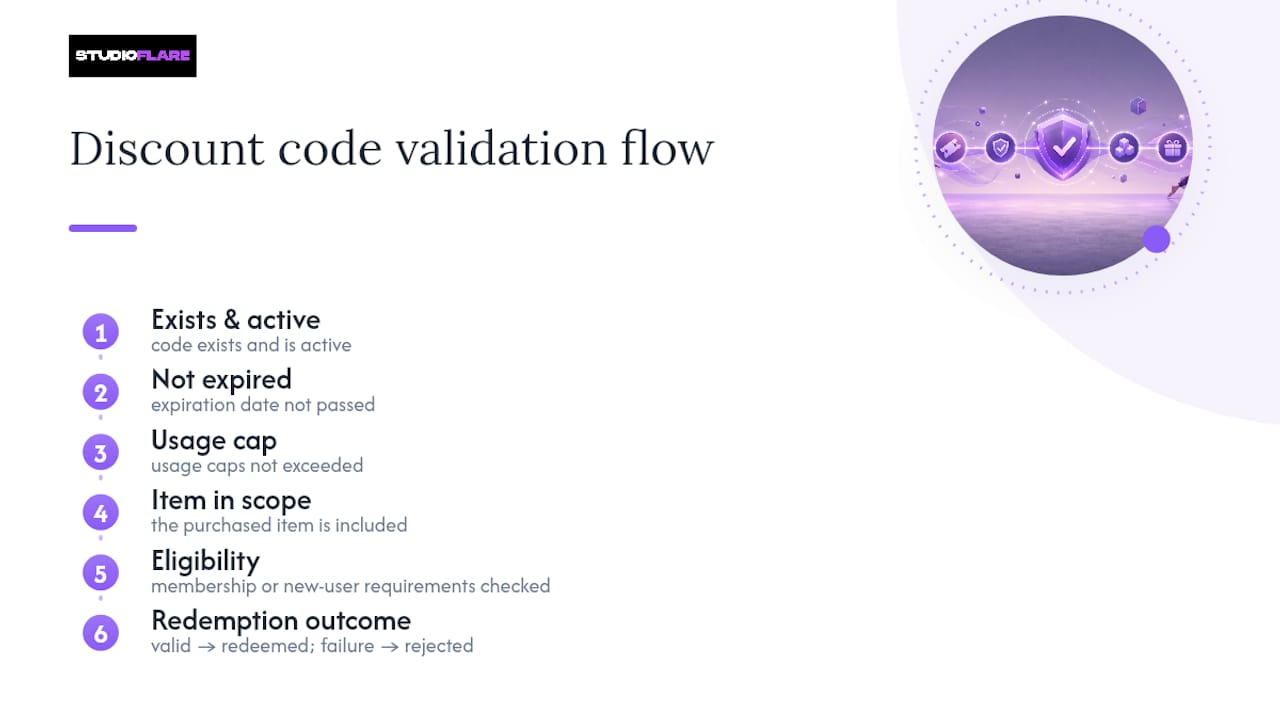
One detail that trips up a lot of studios: once a code has been redeemed even a single time, key fields like discount type, value, and scope typically lock. This locking protects transaction records from mismatches between what a customer paid and what the system says they should have paid. If you need a different value, duplicate the code instead of editing the original.
How Should Staff Apply and Edit Codes at the Front Desk?
Staff-side checkout runs the exact same validation as a student self-registering online. A staff-side discount entry field lets someone at the desk key in a code for a parent standing right there, and the system checks eligibility instantly rather than trusting the entry blindly.
- Enter the code in the checkout screen; the platform validates expiry, scope, and usage caps automatically.
- Fields that haven't been used yet stay editable; once a code is redeemed once, expect type, value, and scope to lock.
- When a code needs a tweak after it's gone live, duplicate it rather than editing the locked original.
- Limit discount-creation permission to a small group of admins so a busy front-desk staffer can apply codes but can't accidentally create a 90% discount on tuition.
What Should You Track in Your Discount Reports?
Your discount report is the record that tells you whether a campaign worked and whether the numbers reconcile with what actually hit your bank account. Studio platforms typically display a list with internal name, code string, expiry date, per-student limit, remaining versus total usage, and active or inactive status.
- Watch remaining-uses counters closely as a campaign nears its cap, and deactivate or extend before customers hit a dead code.
- Cross-check discount redemptions against your payment processor's records, not just your studio software's internal log.
- Account for refunds separately. A refunded transaction that used a discount code shouldn't count as a successful redemption in your campaign math.
- Choosing a payment processor built for recurring billing makes this reconciliation faster, since discount data and payment data stay closer together.
What Naming and Security Habits Prevent Discount Abuse?
Loose naming and unrestricted access are how a well-meaning promo turns into a bookkeeping headache. A little structure up front avoids most of it.
- Separate internal names from public codes. "Fall2026Trial" as the visible code, "Fall Trial Push, internal tracking" as the name only staff see.
- Document every active promo somewhere your team can reference, including what it's scoped to and when it expires.
- Test before you go live: run it against a staging student account, try it staff-side, and confirm the payment settles at the discounted amount before announcing it.
- Restrict who can create codes. Limiting creation permission to specific roles cuts down on accidental high-value discounts going live.
- Cap high-value promos and rotate sensitive codes that get shared publicly, so a code posted on social media doesn't stay valid indefinitely.
Pro Tip: If a code is going out in a public social post, cap its total uses tightly. A code meant for 20 families can spread a lot farther than you expect once it's screenshotted.
How Does Integrated Discount Management Cut Admin Work?
Manually tracking who redeemed what, cross-referencing a spreadsheet against Stripe deposits, and chasing down a family that says a code didn't work costs studios real hours every month. When discount creation, scoping, usage caps, and reporting all live in one system, that reconciliation work shrinks to a glance at a status column instead of a spreadsheet hunt.
Built-in Stripe billing and AI-driven reporting speed up the part that used to eat an afternoon: matching redemptions to actual deposits. Studios that lean on templates and campaign guides for structuring promos tend to avoid the scope mistakes that turn a clean campaign into a confusing one.
— StudioFlare Team
Try Discount Codes Built Into StudioFlare
Most studios juggling promo codes across spreadsheets and separate payment tools lose track of what's active, what's expired, and what actually got redeemed. StudioFlare keeps discount creation, scoping, usage caps, staff-side application, and reporting in the same platform where your billing already runs, so a promo code and the Stripe payment it touches never drift apart.

Every field covered in this guide, internal names, code strings, expiry, per-student caps, exists inside StudioFlare's studio management platform, tied directly to automated Stripe billing so redemptions reconcile against real payments automatically. If you're switching off spreadsheets or an older system, the Mindbody alternative built for dance studios covers this same discount workflow alongside registrations, attendance, and livestreaming. Set up a test discount code on a trial account to see how scope and caps behave before you commit to a full campaign. You can create your studio and build your first code in the time it takes to read one more help article.
Sources
- Discount Codes | Groovio Pty Ltd Help Center
- Studioware Help Center - Discount Rules
- Subscription Billing for Dance Studios: A Complete Guide for Merchants | Payment Gods Blog