

The fastest reliable way to run online dance registration is a studio-focused system with family accounts, integrated Stripe billing, digital waivers, and automated waitlists, not a generic form builder. Studio admins should start by creating an account and connecting a payment processor. Parents should look for the studio's registration link and set up one family account for all their dancers.
TL;DR:
- Family accounts that support multiple students and integrated billing through Stripe streamline the checkout process and reduce manual data management.
- Automated waitlists with instant notifications prevent classes from remaining empty and help fill spots quickly.
- Precise form design, including key fields and grouped sibling entries, minimizes orphaned data and encourages completion.
- Protecting sensitive data requires HTTPS, strong passwords, two-factor authentication, and the use of PCI-compliant processors for payments.
- Having a visible support contact and troubleshooting list on the registration page significantly decreases abandoned signups and administrative follow-up.
Table of Contents
- What Is the Difference Between Online Dance Registration and a Basic Signup Form?
- The Setup Checklist Every Studio Should Follow
- What Fields and Waivers Belong on a Dance Registration Form?
- Which Technical Features Actually Matter for Registration Software?
- How Should Studios Handle Registration Fees and Tuition Online?
- How Do Waitlists, Approvals, and Notifications Actually Work?
- What Security Steps Protect Family Data During Registration?
- What to Do When a Parent Gets Stuck Mid-Registration
- StudioFlare Team Perspective: What Actually Saves Time
- A Practical Way to Put This All in Place
- Sources
What Is the Difference Between Online Dance Registration and a Basic Signup Form?
Online dance registration means the whole enrollment process happens on the web: creating a family account, picking classes, signing waivers, and paying tuition, all in one connected flow. A basic signup form, like the kind built in a general form tool, just collects information. It does not manage capacity, trigger a waitlist, or bill a card automatically next month.
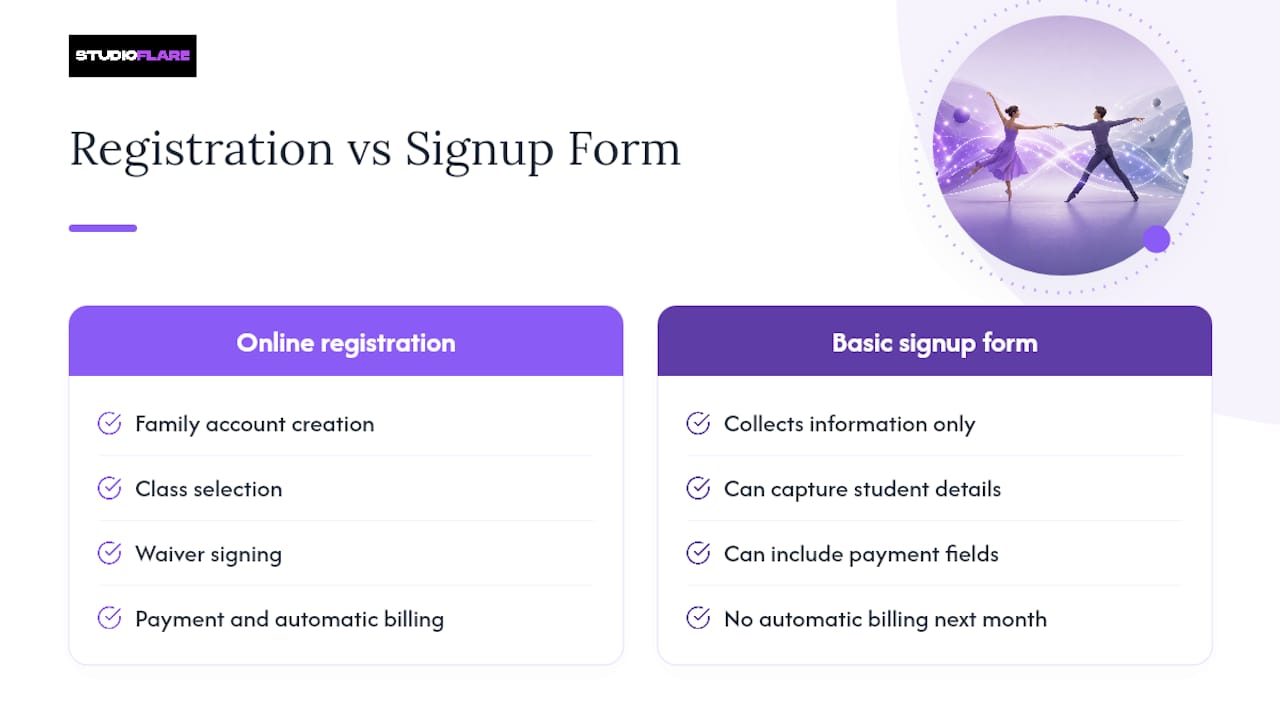
That distinction matters for a growing studio. A dance registration form built with Wufoo can capture student details, class choice, and payment fields fast, which makes it a fine starting point for a studio testing the waters. But once you have more than a couple dozen families, you need something that tracks who is enrolled where, flags who still owes money, and automatically moves the next kid off the waitlist when a spot opens. That is the real job of dance registration software, and it is a different tool from a form.
The Setup Checklist Every Studio Should Follow
Getting online class registration running is not complicated, but skipping a step almost always shows up later as a support ticket or a bounced payment — learn best practices from Online Courses | Superhero Swim. Work through these in order:
- Create your admin account and set user roles so front desk staff, instructors, and owners each see what they need.
- Publish your class schedule with capacity limits and session start dates locked in before you open registration.
- Set up family accounts that support multi-student checkout, so a parent with three kids in four classes checks out once.
- Build your registration form fields and attach the correct waiver to each class or program.
- Connect and test your payment processor. Run a real test transaction through Stripe before you announce anything.
- Test the entire flow on both desktop and mobile using a fake multi-student scenario to catch broken steps.
- Publish your registration links, turn on automated confirmation emails, and soft-launch to a small group first.
Pro Tip: Run your own test registration as a "parent" with two fake siblings in different class levels before you announce anything publicly. This is where most broken checkout flows get caught.
What Fields and Waivers Belong on a Dance Registration Form?
The fields you collect determine how much cleanup your front desk does later. Too few fields and you are calling parents for missing information mid-season. Too many and families abandon the form halfway through.
At minimum, collect:
- Student's full name and date of birth (age often determines class placement)
- Parent or guardian name, phone, and email
- Emergency contact different from the primary parent
- Medical conditions, allergies, or physical limitations relevant to dance
- Class details: style, level, section, start date, and assigned teacher
- Signed acknowledgment of the liability waiver, photo/video release, and refund policy
On layout, the studios that see the fewest abandoned forms use progressive disclosure. Ask for the basics first, then reveal class selection, then payment, rather than dumping everything on one long scroll. Group sibling entries together so a parent registering three kids does not restart the process three times. Show the running total and any nonrefundable fees before the final payment screen. Some studio portals require waiver acceptance and account setup as separate steps before checkout even opens, which cuts down on families who sign up without reading the cancellation terms.
Which Technical Features Actually Matter for Registration Software?
Not every feature on a vendor's list affects your daily operations. Some do, every single day. Prioritize these when evaluating a platform:
- Family account profiles that hold multiple students and saved payment methods under one login
- Integrated billing through a processor like Stripe, with autopay, invoice history, and stored cards
- Automated waitlists that notify the next family by email or text the moment a spot opens
- Attendance tracking and a parent portal so families can check their own schedule without calling
- Exportable rosters and financial reports for tax season and instructor payroll
- Built-in livestreaming or video-on-demand if you run any hybrid or online classes
- Mobile responsiveness, but with real desktop reliability for anything complicated
Mobile accessibility matters because most parents open the registration link from their phone first. But complex enrollments, especially families registering multiple kids across different levels, tend to work more reliably on a desktop screen, where a longer form does not require constant scrolling and re-tapping. Testing the same registration path on both a phone and a laptop before launch catches problems a single-device test misses entirely.
How Should Studios Handle Registration Fees and Tuition Online?
Most studios run one of a few billing models: a nonrefundable registration fee charged once per season, monthly autopay tuition, term-based lump billing, or drop-in class passes for casual students. None of these are inherently better. The mistake is picking one and then hiding how it works from the parent until checkout.
- Show the full total, including fees, before the final payment button, not after
- Label nonrefundable charges clearly, in plain language, right where the parent sees the price
- Process payments through Stripe or another PCI-compliant processor, never through a form that stores card numbers on a local spreadsheet
- Write refund and prorating rules into the confirmation email, not just a buried policy page
Studios that bill the registration fee and first month's tuition together at checkout, a common pattern among portal-based studios, report fewer awkward phone calls about surprise charges. Publishing the total cost clearly at checkout, before the card gets charged, is one of the simplest ways to cut down on chargebacks and confused parents emailing the front desk.
Pro Tip: Put your cancellation window in bold text directly above the payment button, not just in a linked policy document nobody opens.
How Do Waitlists, Approvals, and Notifications Actually Work?
A clean enrollment flow follows the same shape every time: a parent creates a family account, selects a class, signs the waiver, pays, and gets a confirmation email within minutes. Where studios go wrong is in the exceptions, not the standard path.
- New student placement. Decide upfront whether a beginner needs an in-person trial class before formal placement, or whether provisional enrollment (pending an instructor's first-class evaluation) works better for your program.
- Waitlist behavior. Set the notification cadence, such as a text the moment a spot opens with a 24-hour hold before it passes to the next family, so spots do not sit open indefinitely.
- Automatic confirmation email the second payment clears, listing class time, location, and what to bring.
- A reminder email 48 hours before the first class, with parking or entrance instructions.
- A first-class follow-up checking in on how it went and flagging any outstanding paperwork.
Templates for each of these, once written, run on autopilot. A studio's attendance tracking system pairs well here, since it confirms who actually showed up for that first class without a staff member checking a paper roster.
What Security Steps Protect Family Data During Registration?
Registration forms collect exactly the kind of information that matters most to protect: minors' names, birthdates, health notes, and parents' card numbers. A PCI-compliant processor, not a spreadsheet or a generic email form, should handle every payment, and raw card numbers should never sit on a studio's local computer.
Beyond payments, require HTTPS on every registration page, use strong admin passwords, and turn on two-factor authentication for staff accounts. Collect only the personal information you actually need, publish a clear privacy policy explaining how long you keep it, and store signed waivers in a system you can export from quickly if a licensing body or insurance claim ever asks for them.
What to Do When a Parent Gets Stuck Mid-Registration
Even a well-built form trips people up sometimes, and how fast a studio resolves that friction shapes whether the family finishes signing up or gives up and calls a competitor. The most common failure points are predictable: a parent forgets which email they used for a returning family account, a saved card gets declined mid-checkout, or a sibling's birthdate triggers the wrong class level.

A visible support contact, an email address or a chat bubble, right on the registration page itself, catches most of these before they turn into an abandoned cart. Studios that publish a short troubleshooting list ("forgot your password," "card declined," "wrong class showing up") next to the registration link cut down on phone calls dramatically, since parents can self-serve the fix in under a minute.
For the trickier cases, like a family registering four kids across three programs with a partial scholarship applied to one, staff need a way to see exactly where in the process that family got stuck. An admin dashboard showing incomplete registrations, not just completed ones, lets a studio follow up proactively instead of waiting for a frustrated email. That single feature, visibility into abandoned signups, often does more for enrollment numbers than any redesign of the form itself.
StudioFlare Team Perspective: What Actually Saves Time
Studio-specific tools save real hours because family profiles and Stripe billing eliminate the manual matching that spreadsheets demand. Livestreaming and AI-driven data insights keep families engaged between sign-up periods, not just during them. For deeper operational guides on payments and attendance, the StudioFlare blog is worth a look.
— StudioFlare Team
A Practical Way to Put This All in Place
Everything covered above, family accounts, Stripe billing, digital waivers, automated waitlists, is exactly what StudioFlare was built to handle in one connected system instead of five disconnected tools.

Studios currently piecing together a Wufoo form, a separate payment link, and a group text for waitlist updates end up doing manually what StudioFlare automates: family profiles that hold multiple students and saved cards, waiver signing built into checkout, and waitlists that notify the next parent the moment a spot clears. Built-in livestreaming means hybrid classes do not need a separate Zoom workaround, and the AI assistant answers routine parent questions about balances and schedules without tying up front desk staff. Studios switching from spreadsheet-based systems report fewer admin hours per week and faster enrollment turnaround. If your current setup for managing dance studio payments still involves a spreadsheet and a prayer, create your studio account and connect your first class schedule today.
Sources
- Dance Registration Form — Wufoo gallery
- Online Registration | On Your Toes Dance
- Forest Dance Academy registration — Forest Dance Academy