

Here's a policy you can adopt today: charge a $30 non-refundable registration fee per student, capped at $50 per family, due at enrollment and again each August. That structure works because it covers your real administrative costs (insurance, recordkeeping, licensing) without punishing families who enroll more than one child. Once you've settled on the numbers, don't manage this by hand.
- Set the fee as a one-time item in your studio management software
- Turn on a family cap so siblings don't trigger duplicate charges
- Connect Stripe so the fee bills automatically at signup and renews on schedule
Key Takeaways
A registration fee policy only works when the amount, refund rules, and family cap are decided once and enforced automatically, not negotiated case by case.
| Point | Details |
|---|---|
| Pick a defensible amount | Set $15 to $50 per student with a family cap near $40 to $50, matching common industry practice. |
| Write refund status precisely | Choose fully non-refundable, partial refund, or refundable-before-cutoff, and use that exact wording everywhere. |
| Automate the family cap | Configure your software to stop billing once a household hits its cap, so no one does this math by hand. |
| Connect Stripe for billing | Enable auto-billing, payment retries, and receipts so a declined card never quietly drops a family. |
| Test before launch | Run a real sandbox enrollment, confirm receipts and reminders fire correctly, then refund the test charge. |
Ready to stop tracking registration fees in a spreadsheet? StudioFlare's studio management platform sets up one-time fees, family caps, and Stripe billing in one place, so your policy runs itself instead of running through you.
Table of Contents
- Building a Registration Fee Policy for Your Dance Studio
- How Much Should a Dance Studio Charge for Registration?
- How Do You Automate a Registration Fee Policy in Studio Software?
- What to Tell Parents About the Registration Fee
- Launching Your Updated Registration Fee Policy
- How StudioFlare Automates Your Registration Fee Policy
- The Gap Between Writing a Policy and Enforcing One
- Sources
Building a Registration Fee Policy for Your Dance Studio
A registration fee policy isn't just a number on your registration form. It's a set of five decisions: amount, refund status, per-student versus family pricing, due date, and what happens when something goes wrong. Get those five right and you never have to answer the same billing question twice.
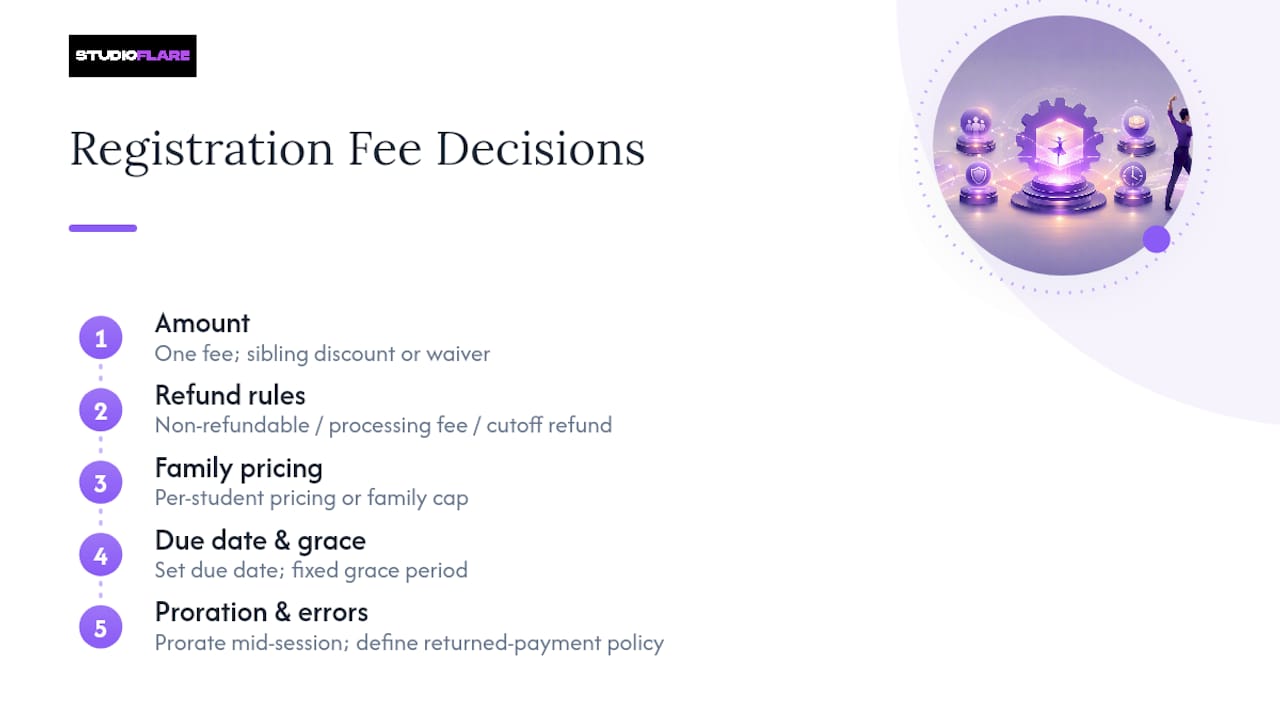
Amount. Pick one figure and apply it consistently, then decide whether a sibling in the same household pays it in full, at a discount, or not at all.
Refund rules. Spell out exactly one of three states: fully non-refundable, refundable minus a processing charge, or refundable only before a cutoff date (say, before the first class meets). Vague language like "fees are generally non-refundable" invites arguments. Precise language ends them.
Family caps. A cap means the third and fourth child in a household don't pay full freight twice over, which keeps larger families from enrolling elsewhere.
Timing and grace periods. Set a due date, then decide how many days of grace you'll allow before a late fee kicks in. Late fees should stack the same way for every family, without exceptions negotiated case by case.
Proration and returned payments. If a student joins mid-session, decide whether they pay the full fee or a prorated share, and document what happens when a card is declined or a check bounces.
Policy checklists built specifically for studio owners recommend nailing down exactly these items before you publish anything: amount, refundable status, family rules, due dates, and how fees interact with credits.
Pro Tip: Write your exceptions policy before you need it. Decide now whether a documented family emergency or a studio-side scheduling error qualifies for a waiver, so you're not improvising an answer in front of an upset parent.
How Much Should a Dance Studio Charge for Registration?
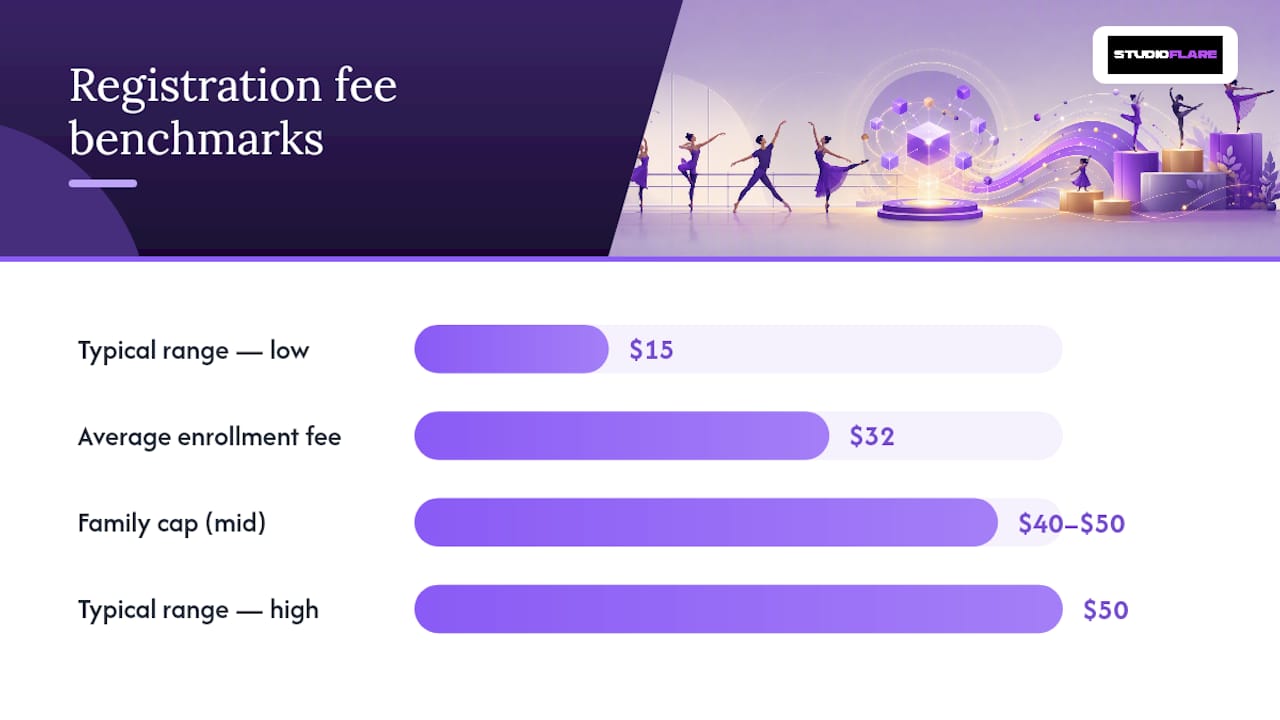
Most studios land somewhere in a defensible range, and the data backs up a fairly narrow band. Industry guidance puts typical registration fees at roughly $15 to $50 per student, with family caps often set around $40 to $50. Separate reporting on actual studio charges found an average enrollment fee near $32 per student, which lines up with what most established studios already charge.
You have three basic models to choose from:
- One-time annual fee. Charged once at enrollment or at the start of each season. Simplest to explain, simplest to automate.
- Deposit-style fee. Framed as a first-month or last-month payment, which some parents find easier to accept psychologically since it feels like prepaid tuition rather than an extra charge.
- Fee spread across tuition. Rolled into monthly billing in small increments. This hides the sting but also hides the line item, so parents sometimes feel blindsided when they notice it later.
Be careful with unlimited-class offers and generous sibling discounts. They feel generous at signup but can quietly erode your registration revenue across an entire season. Model the numbers in a spreadsheet or your software's reporting tools before you commit to a discount structure, especially one applied to every family rather than a targeted few.
How Do You Automate a Registration Fee Policy in Studio Software?
Once your five policy decisions are locked, the next step is translating each one into a software setting. This is where most studios either save themselves hours a week or create a slow-motion billing mess.
- Fee item. Create registration as a distinct one-time charge, separate from monthly tuition, so it shows up cleanly on every invoice and report.
- Family-cap rule. Configure the system to recognize linked family accounts and stop billing once the household hits your cap.
- Refund flags. Tag the fee as refundable or non-refundable inside the software itself, not just in your handbook, so front-desk staff and automated emails give the same answer.
- Proration logic. Set a rule for mid-session enrollments so partial charges calculate automatically instead of getting eyeballed by whoever's at the desk that day.
Studio management platforms typically treat registration as its own fee type separate from class charges, and support several payment scheduling options for the surrounding tuition, according to common studio software configuration guidance. Once the fee item exists, connect it to Stripe for auto-billing, enable payment retries so a declined card doesn't silently drop a family from your roster, and turn on automated receipts with wording that references your actual refund policy, not generic boilerplate.
Pro Tip: Run one full enrollment through a sandbox or test account before opening registration to the public. Charge a real card, confirm the receipt language is accurate, then refund it. This catches webhook and receipt errors before a parent ever sees them.
Set up a weekly receivables report so you catch a failed payment within days, not at the end of the month when it's harder to track down.
What to Tell Parents About the Registration Fee
Parents don't push back on fees. They push back on fees that feel unexplained. Two short scripts cover most of what you'll need.
The short version, for a registration form or FAQ: "A $30 registration fee is due at enrollment and helps keep our monthly tuition rates lower."
The longer version, for your handbook: "This one-time fee covers insurance, licensing, and administrative costs so we can keep monthly tuition focused entirely on instruction."
Framing the fee as a way of keeping tuition itself lower tends to land better than describing it as a vague "administrative cost," according to practical scripting guidance from studio owners.
A confident, specific explanation of what a fee actually pays for turns a potential objection into a non-issue. Parents rarely argue with a line item they understand.
Put the policy in front of parents in more than one place:
- Website tuition or policies page
- Registration form, directly beside the fee field
- Welcome or renewal email each season
- Printed handbook or registration packet
A practical primer on avoiding "hidden fee" perception makes the same point from a different industry: fees that show up unexpectedly damage trust far more than fees that are simply present but expected.
Launching Your Updated Registration Fee Policy
- Finalize the exact wording for amount, refund status, and family cap.
- Update your handbook and website, and schedule a season announcement email.
- Create the fee item in your software, enable the family cap, and connect Stripe.
- Run a full test enrollment to confirm billing, receipts, and reminders fire correctly.
- Train front-desk staff on how to handle disputes so every family hears the same answer.
- Check your receivables report daily for the first week after launch.
How StudioFlare Automates Your Registration Fee Policy
StudioFlare handles the mechanical side of this policy so you're not chasing payments manually. Set the registration fee as a one-time item, cap it per family, and connect it to Stripe for auto-billing and retries.
- One-time fee item separate from tuition, with refund status tagged at setup
- Automatic family-cap enforcement across linked accounts
- Stripe-powered auto-billing, retries, and receipts with your actual wording
- Automated reminders before due dates, reducing manual follow-up
- AI assistant answers quick questions like "who still owes registration?" instantly
- Reports give a live receivables snapshot instead of a manual spreadsheet audit
For studios managing the payment side more broadly, StudioFlare's guide on collecting dance studio payments online walks through the billing workflows this fee plugs into.
The Gap Between Writing a Policy and Enforcing One
Most studios write a perfectly reasonable registration fee policy and then let it fall apart in practice. The handbook says non-refundable. The front desk quietly refunds a frustrated parent anyway. Three months later, every parent who heard about that exception expects the same treatment.
The conventional advice stops at wording. Write a clear sentence, put it in the handbook, done. That's necessary but not sufficient. A policy that lives only in a PDF is a policy enforced by whoever happens to answer the phone that day, and inconsistency erodes trust faster than the fee itself ever could.
What actually matters is encoding the rule where humans can't quietly override it. A family cap set in software doesn't have a bad day. A refund flag tied to the fee item doesn't make exceptions to keep the peace. If you do only one thing after reading this, automate the family cap and the refund status before you touch your wording. Studios that skip this step don't have a communication problem. They have a consistency problem wearing a communication costume.
— StudioFlare Team
Sources
- DANCE STUDIO POLICIES & STUDENT HANDBOOK (Dance Studio Owner)
- Explaining registration fees to clients (Dance Teacher)
- What are Dance Enrollment Fees? Updated 2025 Prices! (DanceParent101)
- Basic Configuration for Dance Master Pro (user manual)