
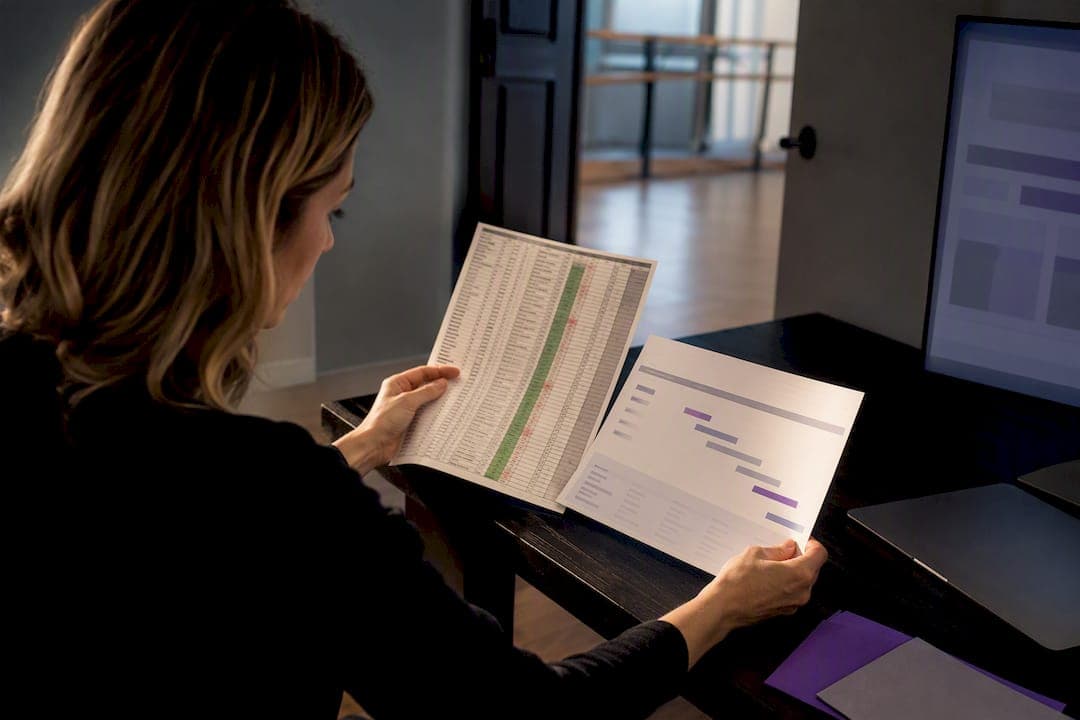
If spreadsheets are eating your evenings, it's time to move to a dance studio management platform that centralizes scheduling, billing, attendance, and parent communication. Studios that make the switch typically report cutting admin hours and slashing billing errors within weeks. The next section covers the specific warning signs that tell you the switch is overdue, not optional.
TL;DR:
- Moving to a dedicated studio management platform can cut weekly admin hours for studios managing more than 80 students or multiple instructors.
- Features like automated billing, real-time attendance tracking, and centralized scheduling replace error-prone spreadsheets and reduce operational chaos.
- Proper software selection requires testing operational fit, clear pricing models, and user experience, avoiding platforms with locked payment providers or limited reporting.
- Phased migration and data cleanup are crucial to prevent errors and ensure a smooth transition, especially during busy seasons like recitals.
- The return on investment often manifests as significant time savings and improved payment accuracy, covering platform costs within a few months.
Table of Contents
- Signs Your Dance Studio Has Outgrown Spreadsheets
- Core Workflows a Studio Platform Replaces
- How Do You Choose the Right Studio Management Software?
- Step-by-Step Migration Checklist and Rollout Timeline
- Costs, Expected ROI, and Break-Even Examples
- Why StudioFlare Fits Studios Replacing Spreadsheets
- The StudioFlare Team's Take on Making the Switch
- Try StudioFlare: How to Start a Trial or Book a Demo
- Authoritative Resources for Security and Software Selection
- Sources
- FAQ
Signs Your Dance Studio Has Outgrown Spreadsheets
Spreadsheets work fine for a handful of classes and a single instructor. They break down the moment your studio starts scaling, and the breakdown rarely looks dramatic at first. It shows up as small annoyances that quietly compound into real operational damage.
The clearest signal is double bookings. When two instructors edit the same roster tab from different devices, someone's changes get overwritten, and a family shows up to a class that's already full. Missed tuition payments are the second red flag. Without automated reminders, you're manually chasing invoices through text messages and email, and that chase eats hours you don't have.
Watch for these failure patterns specifically:
- Class rosters that don't match who actually shows up, because attendance lives in a separate tab nobody updates in real time
- Waitlists managed through sticky notes or a group chat, so spots go to whoever texts fastest rather than whoever's been waiting longest
- Multiple versions of the "master schedule" floating around because three people have edit access and no one's is current
- Recital season chaos: costume sizes, ticket counts, and seat assignments scattered across four different files
- Parent questions about billing or schedule changes answered inconsistently depending on who picks up the phone
An industry buyer-guide estimate puts manual admin work at 5 to 10 hours weekly for small operations, and that number climbs fast once you add instructors or locations. A 150-student studio running on spreadsheets often has an owner doing unpaid bookkeeping work every night after the last class leaves.
Multi-instructor studios feel this first. Once you have three or more teachers each touching the same files, version control turns into a part-time job nobody signed up for.
Core Workflows a Studio Platform Replaces
Every spreadsheet tab your studio maintains right now maps to a specific feature in dedicated studio management software. Seeing that mapping side by side makes the case for switching a lot more concrete than a general pitch about efficiency.
-
Scheduling and enrollment. Your class roster tab, the waitlist notepad, and the teacher availability calendar all become one synced system. When a spot opens, the platform pulls the next family off the waitlist automatically instead of you scrolling through a sign-up sheet.
-
Billing and payments. Recurring tuition charges, late fees, and reconciliation against your bank statement stop being a monthly fire drill. Studio platforms run autopay through processors like Stripe, charge cards on the same date every month, and flag failed payments before they become awkward front desk conversations.
-
Attendance and check-in. Paper roll call and the attendance tab get replaced by tablet or app check-in that logs who showed up in real time. That data rolls up into no-show reports, which matter more than most owners realize. A student who's missed four classes in a row is a retention risk long before the parent calls to cancel, and tracking attendance digitally surfaces that pattern automatically instead of burying it in a spreadsheet nobody reviews.
-
Parent portal and messaging. The group text chain and the "reply-all" email announcement both disappear. Parents log into a portal to see schedules, invoices, and class notes, and you send announcements to one class or the whole studio without exporting a contact list first.
-
Recital, costume, and ticketing management. Costume sizing sheets, seat inventory, and ticket sales get folded into one module instead of three separate files that never quite agree with each other. Online ticket sales also mean you're not handling cash at the door during your busiest week of the year.
-
Reporting and exports. Payroll hours, revenue by class, and tax-season exports come out of the system in a few clicks instead of a weekend spent cross-referencing tabs.
The pattern across all six is the same: spreadsheets store data, but they don't act on it. Software syncs across staff, updates in real time, and pushes alerts when something needs attention. Vertical-specific features like recital management and costume sizing exist precisely because general spreadsheets and generic business tools were never built for how dance studios actually operate.
How Do You Choose the Right Studio Management Software?
Picking software is where owners waste the most time, mostly because they evaluate on gut feeling instead of a structured comparison. A simple three-bucket scorecard fixes that. Score each vendor on operational fit, commercial terms, and user experience, and you'll spot the wrong fit before you sign a contract.
Operational fit asks whether the platform actually handles your studio's real workflows: multi-location scheduling, private lesson booking, waitlist automation, recital and costume tracking. Test this in the demo, not the sales pitch. Ask the vendor to walk through your actual class schedule, not a generic sample account.
Commercial fit covers pricing structure, contract length, and hidden fees. Look for monthly plans without long-term lock-in, and get clarity on whether pricing scales by active student count, by staff seat, or by a flat tier that caps you awkwardly mid-growth.
UX and integration fit covers how your staff and parents will actually experience the software day to day, plus whether it connects to your accounting and marketing tools without manual re-entry.
Bring these questions into every demo:
- Can you import our existing roster and payment history, and what does that process actually involve?
- Which payment processors does the platform support, and can families update their own card on file?
- Can we export our full data set, including financial records, if we ever need to leave?
- What reports come standard, and can we customize what staff see versus what admins see?
- How are staff permissions handled across multiple locations or instructors?
The SBA's checklist for choosing business software recommends auditing your must-have features and testing integrations before you commit to anything, and that advice holds especially well here, since studio software touches money, minors' data, and daily family communication all at once.
Red flags worth walking away from: no CSV export option, pricing that's only revealed after a sales call, reporting that can't break down revenue by class or instructor, and payment processing locked to a single provider with no visibility into the fees.
Pro Tip: Ask every vendor to show you their reporting screen unprompted, before you ask. If they lead with the dashboard instead of the marketing slides, that's usually a good sign the product was actually built around daily studio operations.
Step-by-Step Migration Checklist and Rollout Timeline
Moving off spreadsheets works best as a phased rollout, not a weekend overhaul. Rushing the switch during recital season is how studios end up with duplicate charges and angry parents.
Before you start: audit your current data. Standardize how you name classes, deduplicate family records, and decide which fields actually matter. Small studios routinely underestimate how much labor this cleanup takes, so budget real staff hours or short-term contractor help for it rather than squeezing it into a slow Tuesday afternoon.
-
Phase 1, days 0 to 30: Pilot with one or two classes. Import that subset's roster and payment history, run billing through the new system for one cycle, and let one instructor test scheduling before you touch the rest of the studio.
-
Phase 2, days 30 to 90: Switch full enrollment over, turn on attendance tracking and parent messaging, and train every staff member on daily check-in and communication tools. This is the window where most of the friction shows up, so keep spreadsheets as a backup reference, not a working document.
-
Phase 3, day 90 and beyond: Retire the spreadsheets entirely. Validate that your reports match what you expect for payroll and tax purposes, then adjust workflows based on what staff actually found clunky during rollout.
Common pitfalls: importing messy data without cleaning it first, which just moves your spreadsheet errors into a new system with a nicer interface. Another is skipping staff training, which pushes everyone back to texting each other instead of using the platform's messaging tools.
Pro Tip: Run your pilot phase during a slower month if your schedule allows it. Testing new billing software during the same six weeks as recital prep multiplies stress for no good reason.
Follow FTC cybersecurity guidance during this transition: limit admin access to platform data, use strong unique passwords for every staff login, and back up exported records before you fully retire your old files.
Costs, Expected ROI, and Break-Even Examples
Most studio software follows a similar pricing shape: a monthly base fee plus a per-active-student charge, with optional add-ons for bulk SMS or extra features layered on top. Budget for the per-student line item scaling as enrollment grows, since that's the part owners most often forget when they first price out a plan.
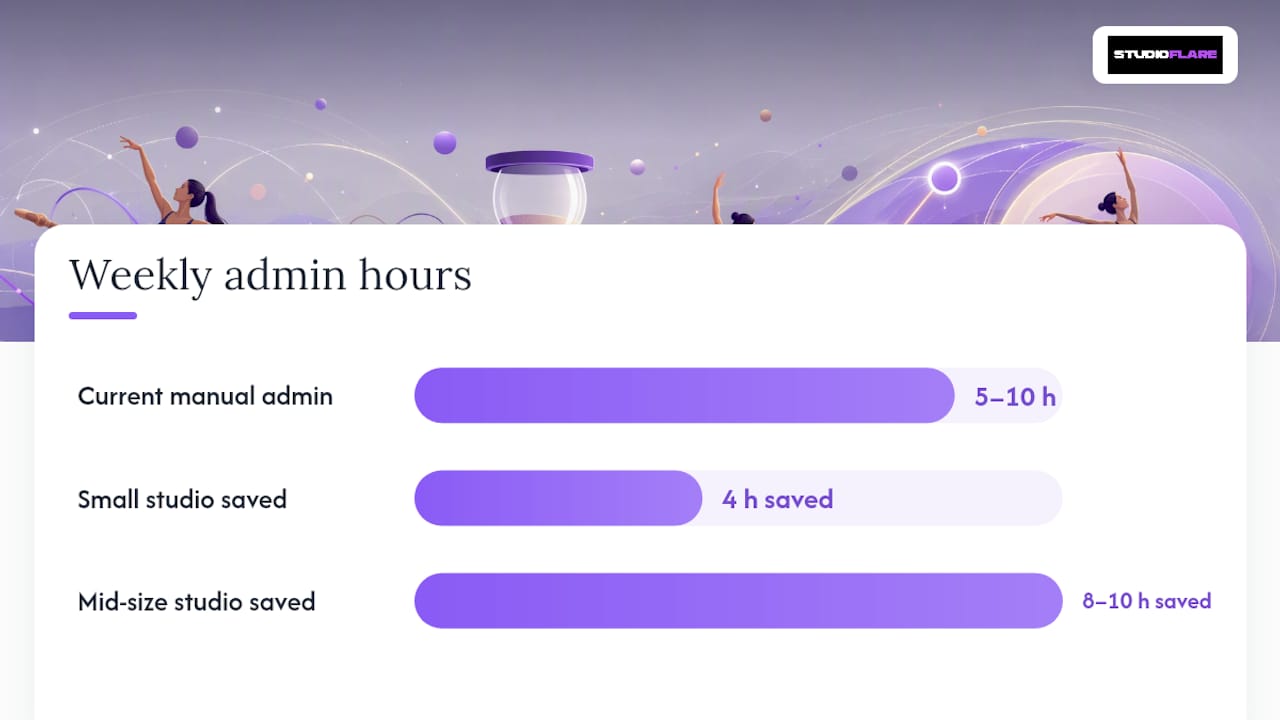
The real return isn't in the subscription cost. It's in the hours you get back. If manual admin currently runs 5 to 10 hours a week, reclaiming even half of that at a reasonable hourly value for your time covers most software subscriptions within the first month or two.
Two rough scenarios illustrate the payback:
- A small studio with 80 students cuts about 4 hours of weekly admin work; at a modest hourly value for owner time, that alone covers a typical monthly platform fee within weeks.
- A mid-size studio with 300 students across multiple instructors saves closer to 8 to 10 hours weekly, plus fewer missed payments from automated billing reminders, which often outweighs the subscription cost several times over by the end of the first season.
Hidden costs to watch for: the labor of cleaning up data before import, optional SMS charges if you rely heavily on text reminders, and any add-on modules for features like livestreaming or advanced reporting that aren't included in the base tier.
Why StudioFlare Fits Studios Replacing Spreadsheets
The platform was designed to cover workflows like scheduling, automated billing, attendance tracking, parent messaging, and recital and costume tools in one interface instead of multiple spreadsheet tabs. It features built-in livestreaming for classes and an AI assistant that answers routine questions about schedules and payments to reduce front desk inquiries. Onboarding typically includes support for importing existing rosters to preserve historical data during the transition.
The StudioFlare Team's Take on Making the Switch
Every studio we talk to underestimates how much spreadsheet chaos costs them until they stop living in it. Start with two things: audit your current data this week, then run a two week pilot with one class before switching everything.
— StudioFlare Team
Try StudioFlare: How to Start a Trial or Book a Demo
You've seen what spreadsheets cost you in hours, errors, and frustrated parents. StudioFlare gives you a direct path off them, with no setup fee and no long-term contract locking you in while you figure out if it fits.

Starting a trial gets you access to core scheduling, billing, and attendance tools right away, along with import support so your existing roster and payment history move over without you re-typing every family's information by hand. If you're currently comparing platforms, the StudioFlare product page breaks down exactly what's included at each tier, and the migration-focused alternative page walks through what studios coming off generalist platforms can expect during the switch. When you're ready, create your studio account and start your pilot with a single class before rolling out studio-wide.
Authoritative Resources for Security and Software Selection
- FTC: Cybersecurity for small businesses, covering password policy, admin access limits, and backup practices
- SBA: Checklist for choosing business software, for auditing needs and testing integrations before purchase
- StudioFlare Blog, for ongoing dance studio operations guidance
Sources
- FTC: Cybersecurity for small businesses
- SBA: Checklist for choosing business software
- Koalendar: Best dance studio software (overview)
FAQ
What Is the Best Dance Studio Management Software?
The best fit depends on your studio's size and workflows, but look for a platform built specifically for dance studios rather than general business tools. Vertical-specific features like recital management, costume sizing, and parent portals, the kind StudioFlare includes, tend to reduce the custom workarounds that generic software forces on you.
How Much Does a Dance Teacher Charge Per Hour?
Rates vary widely by region, experience, and class type, and there's no single national standard rate. Studios typically set instructor pay based on local market rates, class size, and whether the instructor is salaried or paid per class.
Is Owning a Dance Studio Profitable?
Profitability depends heavily on enrollment numbers, retention, and how tightly you control admin costs and missed payments. Studios that automate billing and reduce manual admin time generally protect margins better than those losing hours to spreadsheet upkeep every week.
Can You Sue a Dance Studio?
Legal exposure for a dance studio typically involves injury claims, contract disputes, or billing disagreements, and outcomes depend on your state's laws and the studio's own waivers and policies. Digital waivers and clear documented payment records, features built into dedicated studio software, generally give owners stronger protection than paper forms scattered across file folders.