
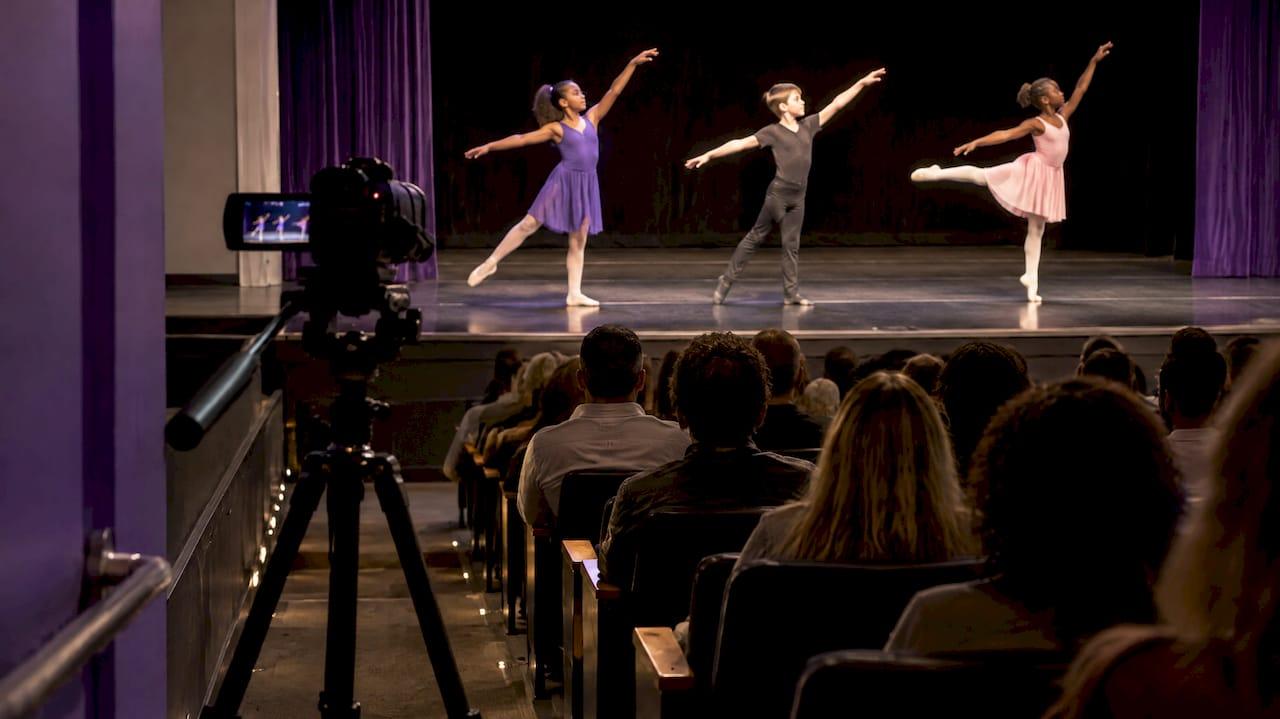
To stream a recital for parents, use two cameras, take audio from the theater's sound board instead of a camera microphone, and send families a private watch link with the start time before show day. Then run the whole chain at dress rehearsal and record locally as a backup. The rest of this guide covers each step, plus the licensing and privacy questions studios tend to skip.
Grandparents in another state, a parent working a shift, a family with a newborn: these are the people a recital stream is for. A good one feels like a seat in the house. A bad one is a wobbly phone clip with muffled music. The difference is mostly planning, not budget.
TL;DR
- Use at least two camera angles: one locked wide shot that shows the dancers' feet and one tighter shot you operate.
- Get audio from the venue's sound board. Camera microphones pick up the room, not the music.
- Check music licensing and media releases before you announce a stream, and send the link privately.
- Stream privately at dress rehearsal, test every angle and the upload, and record every camera locally.
- Tell families the link, start time and time zone twice: a day ahead and an hour before.
Table of Contents
- Start with what parents actually need
- Sort out permissions before you plan cameras
- Cameras: two angles beat one good one
- Audio: the part that makes or breaks the stream
- Internet and platform: simple and redundant
- Run a full rehearsal stream
- Make it easy for parents to watch
- A simple recital stream timeline
- Our perspective: keep the stream inside your studio system
- Where StudioFlare fits
- FAQ
- Sources
Start with what parents actually need
Before you buy anything, write down what a viewing family needs: a link that works on a phone or TV, a start time, sound they can hear clearly, and a way to see their own dancer. Everything else is a bonus.
That list shapes your decisions. If most of your families watch on phones, a clean wide shot with good audio beats a fancy multi-camera switch. If grandparents will gather around a television, you want a stream that is easy to cast and a printed or emailed set of simple instructions.

Also decide early whether this is a live-only event, a live stream with a replay, or a live stream plus a paid download. That choice drives your music permissions, your media releases and how long the link stays active.
Sort out permissions before you plan cameras
This is the step that can sink a stream after the fact, so do it first.
Music licensing
Recital music is almost always copyrighted. U.S. copyright guidance from the National Association for Music Education says that livestreaming an in-person concert on a school or third-party website requires a public-performance license, and that recording a performance and streaming it later requires synchronization permission from the copyright holders. That guidance is written for music programs, but the principle applies to any group streaming copyrighted songs.
When you seek or document permission, the same guidance suggests being specific about the platform, the event date and time, whether a recording will exist and for how long, who can access it, the size of the audience and whether the stream or recording is monetized. If you plan to sell replays, say so up front. Check what your existing licenses cover for a stream, a replay and a paid download, because they are not always the same thing.
Media releases and opt-outs
Your registration forms probably cover photos, but check whether they mention livestreaming and selling recordings. If not, update the wording before the season starts. Our guides on photo and video policies for dance studios and online consent forms cover what to collect.
Plan for families who opt out. Practically, that can mean seating their dancer's number in a part of the program you can frame around, using a cutaway, or offering a private rehearsal recording instead. Decide this before show day, not during the performance.
Guidance from a California school-association resource recommends advance notice to parents and says families with concerns can raise them to discuss options. A studio is not a school district, but the habit is a good one: announce the stream early, explain who can watch, and make it easy to ask questions.
Keep the audience small and private
Use a private or unlisted link, or a ticketed viewing page, rather than a public broadcast. Keep dancers' full names off screen: first names or group names in the program graphics are enough. Our dance studio data privacy guide goes deeper on what to protect.
Cameras: two angles beat one good one
For a full recital, aim for at least two cameras.
- Wide shot, locked off. Frame the full stage including the dancers' feet. Dance is about the whole body and the formations. Lock the camera and do not touch it.
- Tight shot, operated. Someone follows soloists and small groups and picks out details a wide shot loses.
- Optional third angle. Useful for the emcee, large formations from another side, or the curtain call.
If you only have one camera and one volunteer, choose the wide shot and leave it alone. A steady, complete view is better than a shaky attempt at close-ups.
Position gear so the room stays first
The audience in the seats came for a live show. Keep tripods out of sightlines and aisles, limit how much your camera operator moves, and avoid lights or screens that glow in the dark house. Confirm camera positions and cable routes with the theater well ahead of time, since many venues have rules about where equipment can go and how cables cross walkways.
If you want families in the lobby or a hallway to follow along, a screen can help. Setups like social media wall screens show how to run displays at an event without needing a technical team on hand.
Set exposure under real lighting
Stage lighting changes constantly, and automatic exposure struggles with it. Set exposure and white balance manually during your technical or dress rehearsal, under the actual lighting cues, so a bright spotlight on a soloist does not wash out the picture. Check a few different looks: a dark contemporary piece, a bright tap number, a saturated color wash.
Audio: the part that makes or breaks the stream
Parents forgive a slightly soft picture. They do not forgive missing, clipped or echoing sound. Treat audio as the most failure-prone piece of your setup.
Take a feed from the house console
The best source is the signal already going to the theater speakers. Ask the venue's sound technician for a line-level auxiliary or matrix output from the house console. A camera microphone records the room and the crowd, not the music, so do not rely on it as your main source.
Then build out the mix:
- Route the emcee's microphone through the same board so announcements are clear.
- Add a low-level audience microphone so viewers hear applause and feel the room.
- Ask whether the console output is mic-level or line-level, and set your input to match.
- Wear headphones during the show and listen the whole time.
- If you can, record a separate backup audio file.
Set levels at soundcheck
During rehearsal, play your loudest number and your quietest. Aim for peaks that stay comfortably below clipping, and fix anything that distorts. Many audio guides suggest keeping dialogue peaks roughly between negative 12 and negative 6 decibels full scale, which leaves headroom without losing detail. Check levels again before the audience enters, because a full house changes the room.

Watch for audio delay
If you use a mixer and a video switcher, audio and video can drift apart because video takes longer to process. One dance-video hobbyist added about 100 milliseconds of delay to each microphone channel to line things up. Your exact number will differ, so test with a clapper or a sharp tap number and adjust until lips and sound match.
Internet and platform: simple and redundant
The platform matters less than the connection. Your options include a private video-platform event, a ticketed viewing page, or a livestream built into your studio software. Pick whichever your families can open in one tap.
A few ground rules:
- Test the venue's upload speed on site. Use a wired connection if the theater offers one, not guest Wi-Fi shared with the audience.
- Leave headroom. A common rule of thumb is keeping about 20% of your upload capacity free above your total streaming bitrate. If you send a primary and a backup stream, count both before adding that margin.
- Keep a backup. If your encoder allows it, send a second stream or have a cellular hotspot ready.
- Record locally. Save every camera's feed on its own device or card. If the internet drops mid-show, you still have a complete recording to share afterward.
A studio that streams classes regularly already has most of this practice. Our guide on how to livestream your dance classes covers the basics if you are new to it.
Run a full rehearsal stream
The dress rehearsal is your only chance to find problems cheaply. Treat it as a real broadcast.
- Stream privately, using the same platform, encoder and internet connection you will use on show day.
- Check every camera angle from the viewer's side, not just from the camera.
- Watch exposure under each lighting look.
- Listen to the audio mix on both headphones and a phone speaker.
- Confirm the upload is stable for the full length of a long number.
- Have someone outside the building open the link on a phone and report what they see.
Write down what went wrong and who fixes it. On show day, assign roles: one person on the wide camera, one on the tight camera, one on audio, one on the stream dashboard, and one person who answers family questions by phone or email.
Make it easy for parents to watch
A technically perfect stream still fails if families cannot find it. Send the watch link, start time with time zone, and a few plain instructions a day before and again an hour before the show. Include how to watch on a TV, since many families will.
Some extra touches that help:
- Intermission slate. Put up a simple graphic that says the show is on a planned break, with the return time, so viewers do not assume the stream broke.
- A running order. Share the program ahead of time so families know when their dancer's number comes up.
- A fallback link. In a Dance Teacher case study of a virtual recital, one studio offered a Dropbox fallback and a volunteer troubleshooting helper for families with TV or computer problems. A backup route and a named human to ask can turn a platform hiccup into a minor delay.
- An end date for the replay. Tell families how long the recording will stay available, and keep that consistent with your music permissions.
Our guides on parent communication and recital planning milestones can help you build these messages into your calendar so they do not get forgotten.
A simple recital stream timeline
| When | What to do |
|---|---|
| Weeks before | Check music licenses and media releases, notify families, decide on live-only or replay |
| 2 to 3 weeks before | Confirm camera positions, cable routes and house audio feed with the venue |
| Dress rehearsal | Full private stream test, set exposure and audio levels, assign roles |
| Day before | Send the link, start time with time zone, and viewing instructions |
| 1 hour before | Send a second reminder, check upload speed, confirm local recording |
| Show | Monitor audio on headphones, run the intermission slate |
| After | Share the replay if planned, set an end date, collect feedback |
Our perspective: keep the stream inside your studio system
We built StudioFlare for dance studios, and recital streaming is a good example of why that matters.
Most of the stress around a recital stream is not the camera. It is the logistics: who is allowed to watch, how they get the link, and whether it works for the right families only. When livestreaming sits in the same place as registration and access control, you are not pasting links into group texts and hoping they stay private.
Our livestreaming is designed to connect with class registration and access control, so the families who should see a stream can find it, and others do not. Pair that with parent communication tools, digital waivers and forms, and bulk messaging, and the announcements, consent and reminders live alongside the stream itself.
We also think studios should not pay for old records. We charge for active students, not historical ones, with month-to-month pricing and no annual contract or setup fee.
StudioFlare Team
Where StudioFlare fits
If you are tired of piecing together spreadsheets, group texts and separate video tools, StudioFlare puts registrations, tuition billing through Stripe, parent messaging, digital waivers and built-in livestreaming in one platform made for dance studios.
Plans are published at studioflare.io: Starter is $29 per month, Pro is $49 per month, and each active student adds $1 per month. There is no setup fee and no contract. Livestreaming has no published price, so check the pricing page for current details.
When you are ready, you can create your studio and see how it works for your own classes and recitals.
FAQ
How many cameras do I need to stream a dance recital?
Two is a good target: a locked wide shot showing the dancers' full bodies and feet, and an operated tighter shot for soloists and small groups. A third angle is optional. If you only have one, use the wide shot and leave it untouched.
Can I use my phone for a recital stream?
A phone can work for a small or informal show, especially as a backup angle. For the main feed, a dedicated camera on a tripod with a stable connection and proper audio from the sound board will give families a much better result than a handheld phone.
Do I need a license to stream recital music?
Usually yes. U.S. guidance from music educators says streaming a live performance on a third-party site requires a public-performance license, and a recording that is streamed later needs synchronization permission. Check what your current licenses cover and ask the license holders about streaming, replays and paid downloads.
How do I keep the stream private?
Use a private or unlisted link or a ticketed viewing page, send it only to registered families, keep dancers' full names off screen, and set an end date for any replay. Remind families not to share the link publicly.
What if the internet goes down during the show?
Record every camera locally so you still have a complete show to share afterward. Keep a backup connection such as a cellular hotspot, and let families know through your usual channels what is happening and when the replay will be available.
Sources
- NAfME copyright guidance for performance, 2023
- Legal Issues Associated with Live Streaming, ACSA
- What It Took to Pull Off An Epic Virtual Recital, Dance Teacher
- Live Video Streaming for In Sync Dance, Shane's blog