

Re-enrollment is how a dance studio turns this season's students into next season's roster. Families get a clear window, a short path to confirm their classes and a payment method on file. The studio gets a headcount early enough to plan schedules, staffing and costumes. The studios that do it well stop rebuilding the roster from scratch every year, and a platform that holds registration, waivers, billing and parent messages in one place makes that routine much lighter. That is what we build at StudioFlare.
Below: what re-enrollment means, how real US studios set it up, the steps for parents, the steps for owners, and what to check when you move records from an old system.
TL;DR
- A returning student is usually one who enrolled in the previous season. Studios treat returners differently from new students on fees, trials and refunds, so read your studio's definition.
- Studios run re-enrollment two ways: families opt in through a portal, or the studio auto-enrolls them and families opt out by a deadline.
- Parents should have a card ready for autopay, any old balance cleared and the waiver and policy approvals in mind before the window opens.
- Owners get the cleanest result from a short window, early returning-family access, a waitlist rule and one record that ties each payment to each enrollment.
- Spreadsheets and group texts break at exactly this moment. One platform for registration, billing and messaging removes the reconciling.
Table of Contents
- What re-enrollment means, and how it differs from a first registration
- Two models: opt in or auto-enroll
- How parents re-enroll: the steps and what to have ready
- How owners run re-enrollment: a working routine
- Why spreadsheets and group texts fail at re-enrollment
- Moving your records from another system
- What StudioFlare offers for re-enrollment
- Our perspective
- FAQ
- Sources
What re-enrollment means, and how it differs from a first registration
A first registration creates a family record: contact details, medical information, a student profile. Re-enrollment reuses that record to place the student in next season's classes. The definition of "returning" varies by studio, and it matters because it changes what the family pays and what they can cancel.
Star Dance Studio's September 2026 policy defines a returning student as anyone who previously enrolled in a regular September to June class, whether or not they finished the season. Returners there are not eligible for the 30-day new student trial period unless a written exception is granted before registration. Registration fees and tuition become nonrefundable once enrollment is final.
Kailua Dance Academy's 2026-2027 returning-student page asks for a $35 deposit to reserve a dancer's spot. It also treats a dancer who returns after a break longer than one summer as a new student.
The lesson for both sides: "returning" is a policy term, not a vague feeling of loyalty. Owners should define it in writing. Parents should check it before assuming a trial period, a waived fee or a held spot.
Continuing a class is not always automatic
Families often assume a class that continues simply carries over. Harlem School of Arts states that students in semester-based classes must register again for Spring 2027 even when they stay in the same class, while full-year classes ending in May or June need no second registration. The practical rule for parents: look up the class end date, not the class name.
Two models: opt in or auto-enroll
Most studios fall into one of two patterns.
Opt-in re-enrollment. The family logs in during a window and chooses classes. Kelli's Kreative Dance Studio, for example, opens returning-family registration weeks before new-student registration, which rewards loyal families with first pick of times. It also requires prior-year tuition and fees to be paid before a family can register.
Opt-out (auto) re-enrollment. The studio places returning students in their current classes and families opt out by a deadline. The Next Step Dance Studio auto-re-enrolls returners and requires a written drop request by May 15. September tuition and the annual registration and insurance fee are charged on June 1, with no refunds or credits after that date. Dreamcatcher's Dance re-enrolls dancers automatically for its August to May season. Its $40 registration fee is processed June 1, and families can request a different class or opt out through a form by the same date. The SunDance Studio also enrolls students in future sessions unless the family drops by the drop date, and instructors there give class recommendations in spring to help plan the fall schedule.
Opt-out protects your headcount, since silence means yes. It also puts weight on communication: a family that never read the email is surprised by a charge. If you choose it, the deadline, the charge date and the refund rule must be stated in the same message, and ideally again in the parent portal.
Opt-in is gentler on families and gives a cleaner signal of intent, but it needs reminders and a short window so decisions do not drift. Either way, the model should be a deliberate choice, written into your policies.
How parents re-enroll: the steps and what to have ready
The flow is nearly identical across studios, because it follows the portal. Here is the typical path, based on the 2026-2027 guides these studios publish.
- Clear old balances. Kelli's Kreative requires all tuition and fees from the prior year and summer session to be paid before registration. A balance can block you from the cart.
- Log in to the parent portal. Use the existing family account. Creating a second one splits the family's history.
- Find classes and pick the student. Select the class, add it to the cart, and choose the student by name. For older ballet, lyrical or technique students, some studios have parents choose a generic option and place the level themselves.
- Approve policies and forms. Miller Marley School of Dance and Voice requires continuing students to approve the policies and a medical form waiver during portal re-enrollment.
- Set up autopay. The same studio asks for a current credit card on file, with tuition collected monthly or quarterly on the 5th. HeartBeat Dance Academy asks parents to add a card and enroll in autopay before selecting classes.
- Wait for confirmation. Submitting is not always the end. Star Dance Studio treats a registration and payment as only a request until the studio sends written acceptance.
Before the window opens, gather: the card you want on file, current medical and emergency contact details, a list of the days the student can attend, and a calendar for any sibling or competition conflicts. Our guide to dance registration forms covers what those forms usually contain.
Full classes and waitlists
Popular times fill within hours. SunDance's system shows full classes in red, and clicking one adds the student to a waitlist. When a space opens the studio emails the family, and if there is no reply within 3 business days the spot goes to the next person. HeartBeat uses the same 3-business-day rule. Parents can join several waitlists, so register for a workable second-choice class and waitlist the ideal one. Check email and spam folders during the window, and for younger dancers heading to class on their own, features such as school arrival alerts help families keep track of the commute when schedules shift.
How owners run re-enrollment: a working routine
The studios above agree on more than their software. Their structure is what makes re-enrollment predictable.
Set the rules before the window
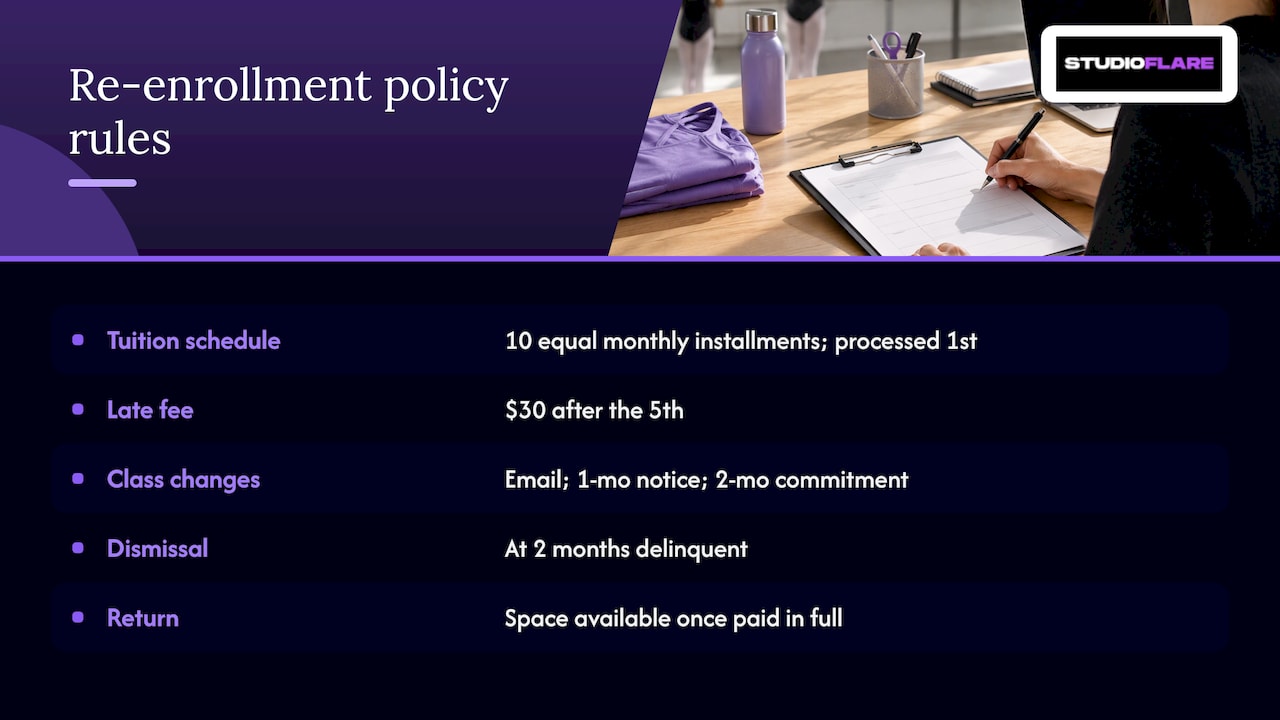
Write down, in one place: who counts as returning, the deadline, the registration fee and when it is charged, the tuition schedule, the refund rule and what happens to a late family. South Bay Dance Center's 2026-2027 packet is a good model of clarity. Tuition is paid in 10 equal monthly installments processed on the 1st, with a $30 late fee after the 5th. Class changes need an email with one month's notice and a minimum two-month financial commitment.
Also decide what delinquency means for re-enrollment. South Bay dismisses students at two months' delinquency but lets them return on a space-available basis once paid in full. Tricia Sloan Dance Center holds a registered status for extended absences, though not a specific class, and re-enrolls without a new registration fee when space allows. It also takes class additions only through its online store, with a $1 processing fee, which keeps requests out of texts and hallway conversations.
Open early for returners, keep the window short
Give returning families first access, then open to new students. Keep the returning window to a few weeks so decisions are made while the season is still fresh. Tell instructors the dates in advance so they can answer questions consistently. Instructor recommendations in spring, as SunDance does, make level placement a conversation rather than a surprise.
Confirm in writing
Whatever your model, send a confirmation that lists the classes, the fees charged, the next payment date and the refund terms. Families who can see the commitment are less likely to dispute it later. Our piece on dance studio deposits goes deeper on the deposit side.
Watch the numbers
Re-enrollment is also a retention metric. Track the share of last season's students who return, by class and by instructor, and compare year over year. Our article on dance student retention shows how studios use that data to keep families enrolled.
Why spreadsheets and group texts fail at re-enrollment
Re-enrollment is the busiest few weeks for a studio office, and it exposes every weak seam. A spreadsheet holds the roster, a payment app holds the money, a messaging thread holds the questions and a form tool holds the waivers. Someone has to match them by hand.
Three failures repeat:
- Payments detached from enrollments. A parent says they paid, but the receipt does not say for which class or which child.
- Capacity drift. Two staff members promise the last spot in the same class because the sheet was not updated.
- Missed messages. The waitlist email, the deadline reminder or the policy change reaches half the families.
The fix is a single system where the class, the student, the waiver, the card on file and the message all live on the same record. Our guide to setting up online dance registration walks through the setup, and the parent portal checklist lists what families should be able to do themselves.
Moving your records from another system
Many owners reading this are mid-switch, often away from older studio software. Re-enrollment season is a natural time to move, because the new season is a clean slate. A smooth migration depends on a short list.
- Export before you cancel. Pull family contacts, student profiles, class rosters, balances and signed-form dates from the old system while you still have access.
- Clean the data first. Merge duplicate families, fix sibling links, and retire students who have not attended in years. Per-active-student pricing rewards a tidy list.
- Settle balances. Decide which old balances carry over and which are cleared, and tell families before the window opens.
- Rebuild the season, then invite families. Set up classes, capacity and fees first, then send returning families their access.
- Run a trial family. Walk one sibling pair through the whole path: log in, add two classes, approve forms, set autopay, receive confirmation.
- Keep the old system until the first billing cycle clears. Then compare totals.
If you are leaving a specific older platform, our dance studio software alternative page explains how the move works.
What StudioFlare offers for re-enrollment
StudioFlare is a studio management platform built for dance studios. Online class registration, digital waivers and forms, a parent portal, automated tuition billing through Stripe, attendance and check-in, bulk SMS messaging and reports all sit in one place. Our AI assistant answers common questions about classes and payments from your own data, which shortens the office-hours rush in the weeks before a season.

Pricing is published and month to month: the Starter plan is $29 per month and Pro is $49 per month, plus $1 per active student per month. There is no setup fee and no contract, and we charge for active students rather than historical records, so students who left do not inflate your bill. Livestreaming has no published price, and SMS and some add-ons carry optional usage fees. See the plans on studioflare.io, and read our guide on collecting dance studio payments online for the billing side.
Our perspective
Re-enrollment is not a marketing campaign. It is the moment a family decides, again, that your studio is part of their week. The decision is mostly made before the portal opens: by the instructor who recommended the next level, by the clear invoice last spring, by the reminder that arrived on time.
What we see as the design problem is friction. Every extra form, every unmatched receipt and every unanswered question is a reason for a busy parent to wait, and waiting is how enrollments are lost. That is why we built StudioFlare around one connected record per family: registration, waivers, tuition through Stripe, attendance and messages together, so the office is not reconciling four tools in the busiest month.
We built it for dance studios specifically, not for generic fitness centers, and we price it simply: month to month, no setup fee, and a charge for active students only. An owner should be able to open the platform in the week before the window and see who is returning, who is waitlisted and who still owes a balance.
StudioFlare Team
FAQ
When should a dance studio open re-enrollment?
Most studios in the research above open it in spring or early summer for a fall start, with returning families getting access before new students. Dreamcatcher's Dance, for example, processes its registration fee on June 1 for an August start. Choose dates that give instructors time to recommend levels first.
Is re-enrollment automatic at a dance studio?
It depends on the studio. Some, such as The Next Step Dance Studio, re-enroll returning students automatically and require a written opt-out by a deadline. Others, like Kelli's Kreative, have families register through the portal. Check your studio's policy and the opt-out date.
What do parents need to re-enroll a dancer?
Have a card ready for autopay, any prior balance paid and your login for the parent portal. You will usually approve the studio's policies and a medical form, then choose classes for each student. Some studios also count a registration fee or deposit as part of checkout.
What happens if the class I want is full?
Join the waitlist, which is free at studios such as SunDance. When a spot opens the studio emails you, and at SunDance and HeartBeat the spot goes to the next family if you do not reply within 3 business days. Register for a backup class in the meantime.
Can a student who left come back?
Usually yes, on the studio's terms. Kailua Dance Academy treats dancers returning after more than one summer away as new students. Tricia Sloan Dance Center re-enrolls students without a new registration fee when space allows and the account is current.
Sources
- Star Dance Studio School Policy
- Kailua Dance Academy: Register for Classes 2026-2027 (Returning Students)
- Harlem School of the Arts: Registration Troubleshooting
- Kelli's Kreative Dance Studio: 2026-2027 Dance Registration
- HeartBeat Dance Academy: Tuition and Registration
- The SunDance Studio: 2026-2027 Season
- The Next Step Dance Studio: Registration
- Dreamcatcher's Dance: Re-Enrollment
- Miller Marley School of Dance and Voice: Policies and Procedures
- South Bay Dance Center: 2026-2027 Registration Packet
- Tricia Sloan Dance Center: Policies